

AI Learning Hub › Learn AI › Self-Paced Courses › Agents Without the Hype › Supervise an Agent
Module 10 · Intermediate
Supervise an Agent
Traces, verification and escalation. What to check before, during and after a run, and why a polished completion message is not evidence that anything changed.
By the end
- Identify useful evidence from an agent run
- Distinguish an activity trace from private reasoning
- Verify an important result independently
- Verify a side effect against the actual target state
- Recognize when an agent’s final report is insufficient evidence
- Identify a situation that should be escalated to a human
- Apply the course’s earlier concepts to a real Stanford-managed agent run
How do you know what actually happened?
Nine modules of vocabulary, and one question left:
- Before the run — we define the job, boundaries, context, and capabilities.
- During the run — we watch actions, results, checkpoints, failures, and adaptations.
- After the run — we verify the important outcome rather than relying only on the agent’s summary.
Supervision spans the run. It is not a final proofread.
This module is different from the others: most of it describes a small task that was actually run in a Stanford-managed AI environment, with the results checked independently afterwards.
Three more words to learn
Trace
An observable record of steps, tool calls, results, approvals, or other activity from a run.
Verification
Checking an important claim, result, or side effect against evidence outside the agent’s own report.
Escalation
Returning a decision or problem to a human when the agent should not resolve it on its own.
These are practical course definitions. Products rarely say “trace” — you will see activity, history, log, run details, or something else, and the environment tested below says “Worked for 30s”. A trace is not hidden chain-of-thought. Stanford’s agentic-risk guidance uses the idea of a human escalation path; this course’s definition is broader and learner-facing.
Supervision begins before the agent starts
The demonstration below is easy to supervise, and that is not an accident. The environment was deliberately narrowed before anything ran: fictional data only, four source files, one permitted output, no web, no connectors, no external communication, and no modification of the sources. Supervision is easier when the environment makes the job observable.
Narrowness does not guarantee correctness. A tightly bounded run can still produce a wrong briefing. What narrowness buys is that the wrongness is findable.
Three supervision moments
Before the run
Know the job, the success condition, the boundaries, the context, the available capabilities, and the expected side effects.
During the run
Observe whatever the product makes visible: actions, file operations, results, checkpoints, adaptation, failures, unexpected divergence.
After the run
Verify important claims, the intended output, the actual target state, unexpected side effects, and remaining uncertainty.
Before, during, and after answer different questions.
A trace shows activity, not private reasoning
This course calls the observable activity record a trace. In the tested ChatGPT Work interface on 18 September 2026, the visible activity appeared under “Worked for 30s.” That is what one interface showed on one date, not a standard label across every ChatGPT surface or every version. Trace is not chain-of-thought.
Here is what the tested environment actually exposed while it worked.
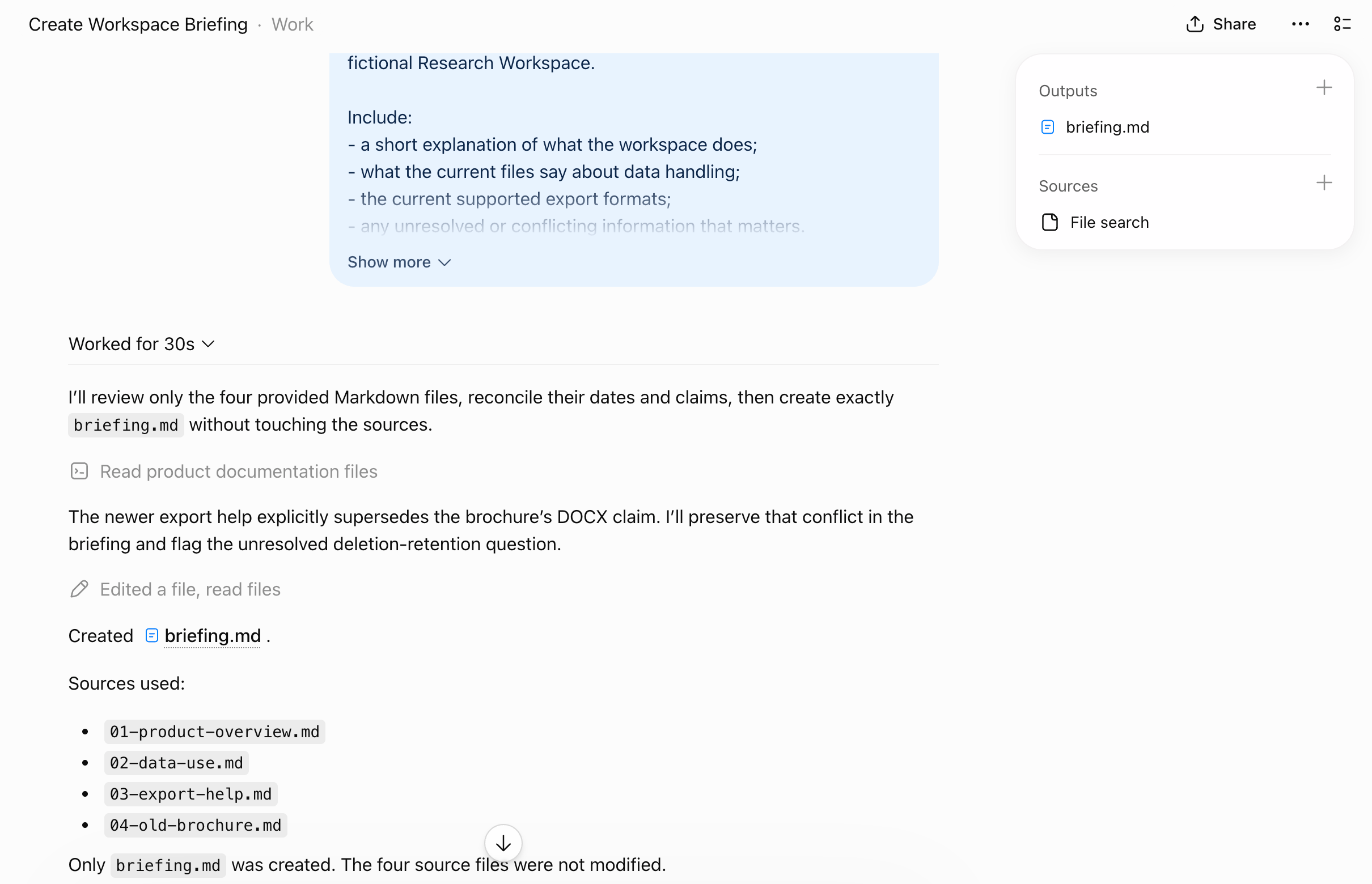
Reading it as evidence, the run exposed:
- a duration — “Worked for 30s,” collapsible;
- two short status statements in the model’s voice, describing what it intended to do next;
- two activity rows, labeled Read product documentation files and Edited a file, read files;
- an Outputs panel naming
briefing.md; - a Sources panel naming File search; and
- a completion message listing all four source filenames.
A trace can help answer what the system did. It may not tell you everything about why the model chose it.
Trace is not chain-of-thought.
The two status statements are worth a moment. They read like intentions — “I’ll review only the four provided Markdown files” — but they are output the product chose to display, not a window into the model. Treat them as claims that can be checked, which is exactly what the rest of this module does.
A visible activity record may be incomplete. It can omit internal model processing, host implementation details, backend service behavior, and logs that are simply not available to you.
The absence of an item from the visible trace is not automatically proof that it never occurred elsewhere in the system.
“Done” is a claim
At the end of the run the agent reported, in substance: Created the practice file briefing.md. Sources used: all four files. Only briefing.md was created. The four source files were not modified.
That is a clear, specific, checkable report. It is also still a report.
An agent’s completion message is part of the trace. It is not the same thing as verification.
So the folder was checked directly, outside the agent. The result is the most useful thing this module found, and it is not what you might expect.
Independent check of the local folder, after the run
- Files present
- Exactly four — the same four that were uploaded.
- Source file hashes
- All four SHA-256 values identical to the baseline recorded before the run. Nothing was modified.
briefing.mdon disk- Not present.
The agent did not lie. briefing.md was genuinely created — inside the product’s own workspace, which is where the uploaded copies lived. The local folder was only the place the files were uploaded from, and the agent never had access to it. Verifying a side effect means knowing which state the agent actually changed.
Scope this to what was observed. In this ChatGPT Work run on 18 September 2026, the uploaded files were copies inside the Work environment, and the generated briefing existed in that workspace rather than in the original local folder. Other agent environments act on different targets — some do work directly on local files — so the lesson is not that uploads are always copies, nor that agent-created files never appear locally. It is that you should first identify which state the task is expected to change.
A supervisor who read “Created briefing.md” and went looking on their own computer would find nothing, and might conclude the agent had failed or invented the file. It had not. They would be checking the wrong target — and that mistake is entirely available to someone who never asked where the work was happening.
Two kinds of verification
Verify the content
Do the material claims match the permitted sources?
For this briefing: the current export formats, the old/new conflict, and the unresolved data-use question.
Verify the side effect
Did the environment actually change in the expected way?
For this briefing: does the file exist, are the sources unchanged, did anything unexpected appear, was anything deleted?
A polished answer cannot substitute for checking the target when the task was supposed to change something.
Both were done here. The content check compared every material claim in the briefing against the four files:
- Current export formats
- Reported as Markdown and PDF. Correct.
- DOCX
- Stated as not currently available, rather than carried across from the older brochure. Correct.
- The old/new conflict
- Surfaced explicitly, naming both dates, and noting that the older brochure remains a potentially confusing source. Handled as asked.
- The unresolved retention question
- Preserved as unresolved, with the possibilities left open rather than settled. Not invented away.
- Outside information
- None found. Every claim traced to one of the four files.
On this run, the content was accurate. That is worth stating plainly, because a supervision module can leave the impression that agents are usually wrong. The answer was fine. What matters is that you only know it was fine because it was checked.
Verification proportional to consequence
Stanford’s current guidance puts it in one line: all agent outputs and actions require verification proportional to impact.
Checking a disposable fictional briefing warrants a lightweight review of the kind above. A consequential change involving sensitive data, external communication, records, permissions, deployment, or money may warrant substantially stronger verification and human control.
There is no formula here, and Stanford does not supply a number. It is a judgment about what the action can do — which is Module 7’s question, arriving at the point where you decide how hard to look.
Sometimes supervision means taking the problem back
Escalation is returning a decision or problem to a human when the agent should not resolve it alone. The course has already met most of the triggers:
- permitted evidence cannot resolve an important question;
- two authoritative sources remain in conflict;
- a requested action crosses a boundary;
- an unexpected tool becomes necessary;
- suspected prompt injection makes the state untrustworthy; or
- the human needs to decide whether the job itself should change.
Escalation is one way a bounded system preserves decisions that belong to the human.
What this run exercised — and what it did not
Every concept in this course, mapped onto the actual evidence from that thirty-second task.
A concept marked “not exercised” is still a finding about this run. Supervision should record what happened, not manufacture examples merely to complete a framework.
- Job
- The exact task prompt, visible in the conversation.
- Boundary
- No web, no connectors, no files outside the set, sources not to be modified, one permitted output.
- Context
- Four fictional source files, uploaded deliberately.
- Tools / capabilities
- Visible only as generic activity rows and a File search source. Specific operations were not itemized.
- Current state
- Partly visible — two status statements showed the task moving from “review the files” to “the newer page supersedes the brochure.”
- Adaptation
- Not exercised. Nothing failed, so no route changed.
- Side effect
- Creation of
briefing.mdin the product’s workspace. - Checkpoint
- Not exercised. No approval prompt appeared before the file was created.
- Failure mode
- Not exercised. No failure occurred on this run.
- Recovery
- Not exercised.
- Trace
- “Worked for 30s,” two status statements, two activity rows, an Outputs panel, a completion message.
- Verification
- Independent folder listing, hash comparison, and a claim-by-claim content check.
- Escalation
- Not triggered. The evidence resolved the question within the boundaries.
Four of thirteen rows are “not exercised.” A single short, successful run simply does not contain a failure, an adaptation, or an approval. Inventing them would have made a better-looking table and a worse module.
What the product does not show matters too
Reviewing the same trace for what is missing is at least as useful:
- No tool inputs. Nothing showed what was searched for or with what parameters.
- No file-by-file activity. One row read “read files” without naming which, or in what order.
- No separate write approval. Creating the file required no confirmation step.
- An imprecise label. The row read “Edited a file, read files” on a task whose only write was creating a new file.
None of this is automatically bad. The activity rows are summaries, and a summary that named every operation would be unreadable for a longer task. If a product does not expose a piece of evidence, supervision has to rely on other evidence.
Which is precisely what happened here. Because the trace did not itemize which files were read, the claim “I used all four” could not be confirmed from the trace — so it was approached differently: the environment contained only those four files, and every claim in the briefing traced back to them. That is weaker than a per-file record, and it is what was available.
Observed in Stanford ChatGPT Edu — verified 18 September 2026.
The task ran in Work mode with the model selector showing GPT-5.6 Sol. Four fictional Markdown files were uploaded from a local folder; the environment received copies rather than access to the folder itself. The product auto-titled the task, displayed “Worked for 30s” as an expandable summary containing two status statements and two activity rows, listed briefing.md under Outputs and File search under Sources, and finished with a message naming all four sources. No approval or permission prompt appeared at any point. The created file existed in the product’s workspace and was openable and downloadable there; it did not appear in the local folder, and the four local source files were byte-identical afterwards.
Commercial product interfaces and Stanford-managed configurations can change. This observation describes this tested environment on this date, and nothing more.
Two Stanford surfaces were checked first and could not be used. Claude Cowork — the option that would have let an agent work directly on a local folder — was not available in the Stanford Claude web application on that date, and is distributed as a macOS desktop download. Claude Code on the web reported “Disabled by org admin” for this organization, while its terminal and editor-extension forms remained available. Which agent surfaces your institution has enabled is itself a supervision fact worth knowing before you plan around a product.
What evidence would you trust?
Four statements an agent might make at the end of a run. For each, ask what you could inspect in order to check it.
A
“I used only the four permitted files.”
B
“I saved the briefing.”
C
“The current export formats are Markdown and PDF.”
D
“No unresolved questions remain.”
One possible review
- A — source use
- The visible trace or activity record, any source references in the output, and the fact that the environment contained only the permitted files. No single item necessarily proves everything — as this module’s own run showed, the trace said “read files” without saying which.
- B — saved briefing
- Check the actual folder or target system. And first establish which one: the run above saved to the product’s workspace, not to the computer the files came from.
- C — export formats
- Open the current source file that states the formats and read it. This is the easiest of the four, because the claim points at a specific document.
- D — no unresolved questions
- Review the source material and the briefing together. This is the hardest claim, because absence is harder to verify than existence: you are checking that nothing was quietly dropped, which means reading the sources yourself.
The right evidence depends on the claim. Notice that B and D are hard for opposite reasons — B because you may be looking in the wrong place, D because there is no single place to look.
Continue, verify, or escalate?
Four situations. What would you do, and what evidence supports it?
Situation A
The agent reads another permitted fictional source.
Situation B
The agent says briefing.md was saved.
Situation C
Two current permitted sources materially conflict, and no stronger source exists.
Situation D
The run proposes accessing a folder outside the defined workspace.
One possible review
- A
- Continue. A permitted capability used on permitted material, inside the job. Nothing here needs a human.
- B
- Verify the target state. A completion claim about a side effect is exactly the case where the report and the state can differ — or where the supervisor checks the wrong target.
- C
- Escalate, or surface the conflict. Silently choosing one source destroys the most useful information in the task. Whether the conflict matters enough to block the work is a human judgment.
- D
- Escalate and return control. The requested capability exceeds the job’s existing boundary, and Module 6 settled that a dead end does not grant new permission.
These are not universal automatic rules. A different job with a different boundary could make D routine. What does not change is that the answer should follow from evidence you can point at.
You do not need to approve every thought or every step
A useful supervisory design lets the agent make ordinary permitted choices while the human keeps visibility into meaningful activity, checkpoints before selected consequences, verification of important outputs and actions, and a route back when the system should not decide alone. Supervision is about retaining meaningful control and evidence, not manually reproducing the work the agent was delegated to perform.
The run above is a fair illustration. Nobody watched it work for thirty seconds. The supervision happened before it started, in how narrowly the job was drawn, and after it finished, in checking what it claimed.
If you completed MCP Without the Mystery: that course closed on three supervisory ideas — reach, authority, and evidence. They map directly: reach is what information and systems the agent can access, authority is what it can cause, and evidence is what actually happened. This course adds the run over time, in which the agent may make repeated choices, adapt, encounter failures, and reach checkpoints. Neither course requires the other.
What to notice
Supervision asks different questions at different moments.
- Before — what have we allowed this agent to work with and do?
- During — what observable evidence shows how the run is unfolding?
- After — did the important claims and side effects actually occur as reported?
When those questions cannot be answered confidently, returning control to the human may be the correct next step.
Before you continue
You are ready for the capstone if you can:
- identify useful evidence from a run;
- distinguish trace from hidden reasoning;
- verify an important claim against its source;
- verify a side effect against the actual target state;
- explain why an agent’s completion message is not independent verification;
- identify an appropriate escalation;
- explain how supervision changes before, during, and after a run;
- identify something a real product exposes and something it does not expose; and
- supervise a bounded agent without manually making every decision for it.