

AI Learning Hub › Learn AI › Self-Paced Courses › Harvey AI at SLS › Organize and Analyze Documents
Module 6 · Beginner → Intermediate
Organize and Analyze Documents
When a conversation should become a collection: what a Vault and a Review Table are for, and getting from a table cell to the passage behind it.
By the end
- Say when a conversation should become a collection
- Describe what a Vault is for
- Describe what a Review Table is for
- Read a table cell’s answer, reasoning, and sources
- Get from a cell to the passage it came from
- Choose between Assistant, Vault, and Review Table — or none of them
When should I use a Vault or Review Table instead of a long Assistant thread?
Module 4 asked one question of Harvey. Module 5 checked the answer. This module is about what happens when one question becomes forty, across a stack of documents, and a single thread stops being the right shape for the work.
When a conversation becomes a collection
A thread is a good place to think. It is a poor place to keep things. Once you are scrolling back to find the document you attached an hour ago, re-pasting the same question against a fourth file, or trying to remember which case said which thing, the thread has stopped helping.
Three surfaces, three jobs. This is not a hierarchy, and the third is not the most advanced — it is just the one that fits a particular shape of task.
Assistant
A question, and maybe a file or two.
Conversational work. You are thinking, not cataloging.
Vault
A collection you return to.
Documents that belong together, organized once, then searched and queried as a set.
Review Table
The same questions, asked of every document.
Structured fields and side-by-side comparison, extracted at scale.
Vault
A Vault is a document collection with Harvey attached to it. You upload files once; after that the whole set is searchable, queryable, and available as the context for a thread. Harvey’s own framing is that Vault exists for working across large document sets rather than one file at a time.
A Vault is not a knowledge base, and Harvey distinguishes them. The Vault landing page in the SLS account counts them separately — it read 8 vaults, 6 knowledge bases when this was written — and offers Create vault and Create knowledge base as two different actions. This course uses a vault.
Our practice Vault
Course practice resource
AI Learning Hub Practice — Civil Procedure Cases
Four public U.S. Supreme Court opinions, chosen to be small but varied:
- Bell Atlantic Corp. v. Twombly, 550 U.S. 544 (2007) — pleading
- Ashcroft v. Iqbal, 556 U.S. 662 (2009) — pleading
- Wal-Mart Stores, Inc. v. Dukes, 564 U.S. 338 (2011) — class certification
- Bristol-Myers Squibb Co. v. Superior Court, 582 U.S. 255 (2017) — personal jurisdiction
Every file came from an official public source — the Library of Congress’s U.S. Reports scans and the Supreme Court’s own slip opinions. Nothing here is confidential, nobody’s work product is in it, and you could rebuild it yourself from the same free sources.
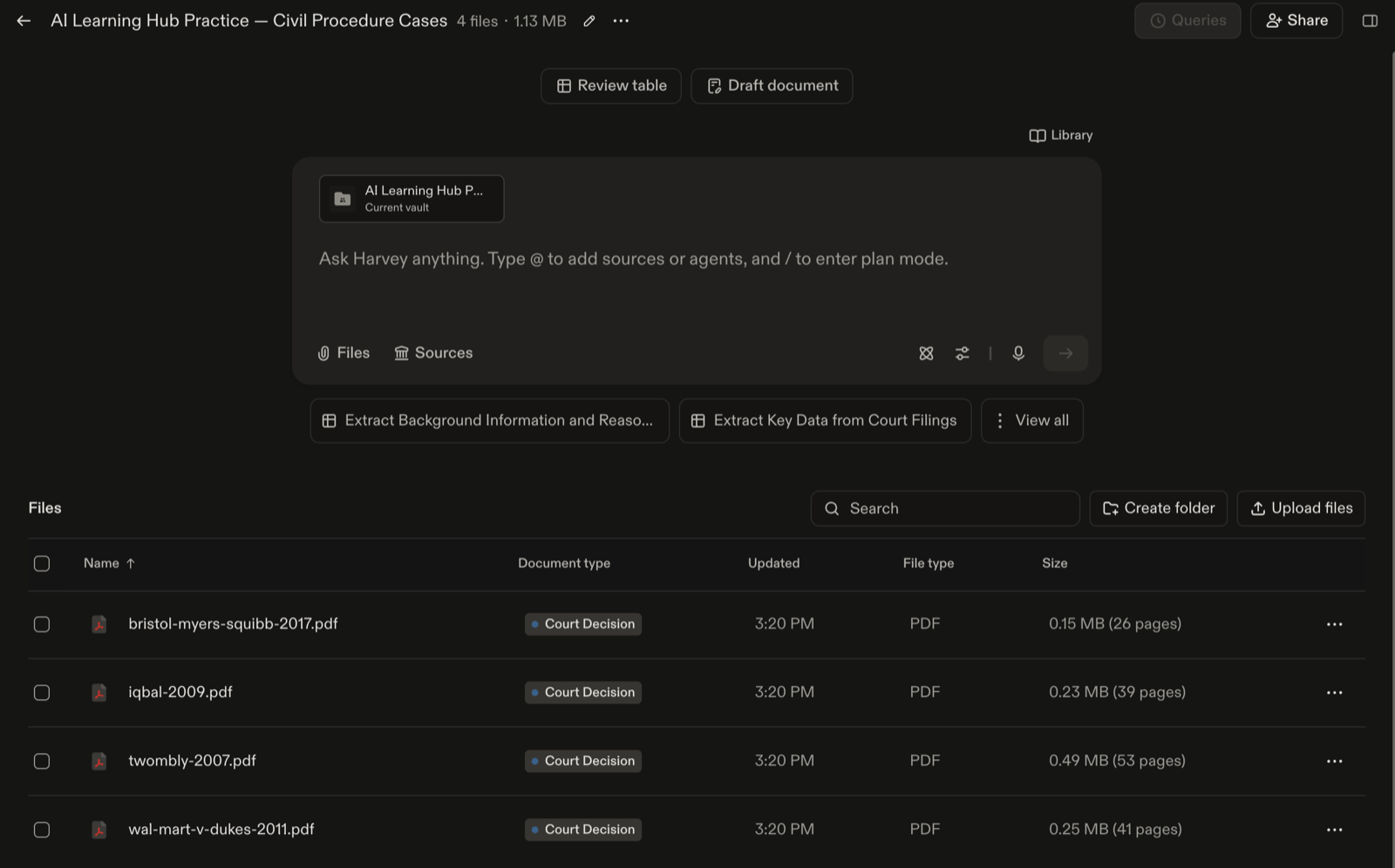
Worth noticing in that view. Harvey classified each file on its own — every one is tagged Court Decision — and it offered workflow shortcuts matched to that type, including Extract Key Data from Court Filings. The query box carries a Current vault chip, so a question asked here runs against the collection rather than against nothing in particular. The file table’s controls are ordinary: Search, Create folder, Upload files, and columns for name, document type, date, file type, and size.
Asking across the collection
With a Vault open, a question runs against every file in it at once, and the answer can distinguish between them. This is the thing a long thread cannot do well: “which of these four cases addresses commonality, and which addresses personal jurisdiction?” is a question about a set, not about a document.
The verification lesson from Module 5 does not change here. Grounding an answer in four documents you chose is better than grounding it in nothing, and it is still not the same as having read them.
Review Tables
When you find yourself asking the same eight questions of every document in turn, those questions want to be columns.
A Review Table puts documents in rows and questions in columns, and fills in the grid. Harvey describes review tables as a way to compare documents, extract key information, and summarize trends across a set.
Observed at SLS · the creation flow
Verified 22 September 2026. Starting a review table from inside a Vault went in two steps.
- Choose the documents first. A picker opened, scoped to the vault, listing each file with its Category. Selecting all four gave “4 files selected” and an Add files button.
- Then describe the columns in plain language. A panel headed “Build your columns” explained: “Each column tells Harvey what to pull from each source, with cited answers and reasoning,” and invited you to “describe what you’d like to extract from each document, or share your use case and Harvey will suggest columns.”
This matches what Harvey documented on 9 September 2026: creating a review table manually “will now open into a guided, Assistant-led flow where you can describe the columns you want in plain language, instead of starting from a blank grid.” You do not build a spreadsheet by hand.
Our practice table
We asked for nine fields across the four cases: case name, decision year, civil-procedure issue, governing rule or doctrine, procedural posture, question before the Court, holding, key legal standard or test, and one short passage worth verifying. Harvey produced all nine, assigning each column a type — a date column for the year, quotation columns for the short factual fields, longer text columns for the reasoning-heavy ones.

What is inside a cell
A cell is not just the text you see in the grid. Opening one showed four things stacked together:
Answer
The short extracted value, carrying its own numbered citation markers.
Reasoning
Harvey’s account of how it got there, with its own markers.
Source
The numbered list of supporting passages.
Human controls
Assigned to, Verify, Flag, Lock cell, and Add comment.
That last group is the interesting one. Harvey has built the checking step into the table: cells can be assigned to a person, marked verified, flagged, locked against further change, and commented on. The product is telling you, in its own interface, that a generated cell is a draft awaiting a human.
From a cell to the page it came from
Selecting a source marker inside a cell opened a three-part view: the table on one side, the cell’s answer and reasoning on the other, and the uploaded PDF itself in the middle — scrolled to the right page, with the supporting passage highlighted.
For the Twombly row, the table’s key-standard cell read “Rule 8(a)(2) plausibility standard: factual matter suggesting agreement; parallel conduct alone insufficient.” Following its citation landed on page 12 of our own file, with this sentence highlighted:
“In applying these general standards to a §1 claim, we hold that stating such a claim requires a complaint with enough factual matter (taken as true) to suggest that an agreement was made.”
The quoted passage in the table and the highlighted text in the opinion matched word for word. That is the shortest route from a generated claim to the authority behind it that this course has shown you — shorter than Module 4’s, because the document never leaves Harvey.
Note what the citation points at. In Assistant, citations pointed outward to a public legal database. Here they point at your own uploaded file. That is a real difference: the table is telling you where in your documents it found something, which is a claim you can check completely.
Structured does not mean verified
A table makes patterns easier to compare. It also makes a wrong extraction look neat.
Rows and columns imply that every cell was produced the same careful way. They were produced the same automatic way, which is a different thing. Inspect:
- surprising values — anything that does not match what you expected;
- important holdings — the cells you would actually rely on;
- quoted language — every quotation, against the source;
- missing cells — a blank is a finding, not a gap to ignore;
- unusually confident summaries — a crisp one-line rule where the law is messy.
One real thing we noticed. In our table, the Iqbal row’s Civil-Procedure Issue cell and its Governing Rule or Doctrine cell both open with the same sentence about Federal Rule of Civil Procedure 8(a)(2).
That is not a legal error, and neither cell is wrong. It is two columns collapsing onto the same material because the questions we wrote overlapped for that case. It is worth seeing, because it is exactly the kind of thing a tidy grid hides: the table looks complete, and one of those two columns is doing no work. Column design is part of the analysis.
We spot-checked two cells against the opinions — the Twombly standard above and Wal-Mart’s commonality cell — and both were supported by the highlighted source text. We did not check every cell, and we ran no citator, so nothing here is a statement that any case remains good law.
Choosing the right surface
Reach for Assistant
One question. A file or two. You are still working out what you are asking.
Reach for a Vault
A set of documents you will come back to, and questions that span them.
Reach for a Review Table
The same fields, wanted from every document, laid out for comparison.
And sometimes the answer is none of them, which the exercise at the end of this module is about.
What this looks like for you
Students
Compare public opinions, organize research material, study how a line of cases fits together, and structure research built on public sources.
Assignment drafts, course materials, professor-provided files, and research-assistant material are not automatically yours to upload. Check the applicable policy and permissions first.
Faculty
Organize a research corpus, compare authorities, structure a first pass over a document set, and surface recurring issues worth investigating.
A table is a map of where to look. It is not scholarly review, and its cells are not findings until you have read the sources.
Clinics
Compare public authorities, organize public filings, and run structured review over materials you are permitted to use.
Actual client documents require clinic policy, supervisor authorization, a confidentiality analysis, and professional-responsibility compliance. This course uses public opinions precisely so you can learn the workflow without any of that being at stake.
Why this matters in practice
Harvey describes Vault as a way to work across large document sets, and Review Tables as a way to compare documents, extract key information, and summarize patterns. In firms that maps onto due diligence, contract review, litigation document review, comparing cases, and structured extraction — work that used to mean a folder of PDFs and a hand-built spreadsheet.
What does not change is who is accountable for the spreadsheet. The verification affordances built into the cells — assign, verify, flag, lock, comment — exist because that work still has to be done by someone.
Practice with the AI Learning Hub
Shared with the Stanford Law School workspace
AI Learning Hub Practice — Civil Procedure Cases
The four-opinion practice Vault described above. Sharing is set so that anyone at Stanford Law School with the link can view it.
The practice Review Table lives inside that Vault and inherits its sharing, so opening the Vault is how you reach both.
Use public or fictional material while practicing, and check your instructor’s policy before applying any of this to coursework. A shared practice resource is a place to learn the workflow. It is not permission to run that workflow on an assignment.
Harvey’s own walkthroughs
Harvey Academy · Login may be required
Use Vault as Your Research Workspace
Harvey Academy video · 3 min
Organizing a collection once and then querying the whole set, with answers grounded in what you uploaded.
Harvey Academy · Login may be required
Build a Review Table for RA Work
Harvey Academy video · 4 min
Creating a vault for an assignment, uploading sources, and building a table with columns like title, author, year, and main argument.
Exercise
Assistant, Vault, or Review Table?
- A. You have one legal question and no document collection.
- B. You want to keep four public opinions together and ask questions across them.
- C. You want the same eight pieces of information pulled from every opinion so you can compare them side by side.
- D. You have confidential clinic files.
Show the answers
A → Assistant. Nothing to organize yet.
B → Vault. A set you return to, queried as a set.
C → Review Table. Repeated questions are columns.
D → Stop before choosing a Harvey feature. Check clinic policy, supervisor direction, confidentiality, and professional-responsibility requirements first.
D is the one that matters. The first three are product questions with product answers; the fourth is not a product question at all, and answering it with “Vault, obviously — that is what it is for” would be the wrong instinct. Not every scenario resolves to a feature.