

AI Learning Hub › Learn AI › Self-Paced Courses › Harvey AI at SLS › Start with Assistant
Module 4 · Beginner
Start with Assistant
Ask a question and know what you asked for: choose sources, read the structure of an answer, and follow a citation to the authority behind it.
By the end
- Ask a question in Assistant and know what you asked for
- Tell Harvey which sources to work from
- Read the structure of an answer
- Follow a citation to the authority behind it
- Continue a thread instead of starting over
- Say what still needs a human before you rely on it
How do I ask Harvey a legal question and understand what comes back?
Assistant is where most new Harvey users will begin: ask a question, choose the context Harvey should use, inspect the answer, and follow the sources before deciding what to do next.
Notice what that sentence does not say. Assistant is not a legal research database, it is not a drafting service that hands you finished work, and an answer arriving quickly and neatly is not evidence that it is right. What Assistant gives you is a fast, source-linked first pass that you then have to check.
Four steps, in order
Step 1
Ask
State the task clearly. Say what you want, not just the topic.
Step 2
Ground
Choose the relevant Sources, files, or Vault material — when they are actually relevant, and not otherwise.
Step 3
Inspect
Read the answer, the citations, and the supporting sources. Not just the prose.
Step 4
Continue or verify
Ask a follow-up when that helps, or leave Harvey and verify the authority in the appropriate primary or research source.
The practice example
Practice example — public law, no client material
The prompt
Explain the difference between a motion to dismiss under Federal Rule of Civil Procedure 12(b)(6) and a motion for summary judgment under Rule 56. Cite the governing rules and leading U.S. Supreme Court cases.
Why this question is safe to practice with. It asks about public procedural rules and public judicial opinions. It contains no private facts, no student assignment text, no clinic or client information, and nothing that belongs to anyone. Every question you use to learn a tool should clear that bar.
What the prompt is doing
Three pieces, and it is worth being able to name them:
Task
Explain the difference.
What you want done.
Scope
Rule 12(b)(6) and Rule 56.
The legal frame that applies.
Evidence request
Cite the governing rules and leading Supreme Court cases.
What support you expect to be shown.
A useful legal prompt usually tells Harvey all three: what you want, what legal frame applies, and what evidence you expect to see. The third is the one people leave out, and it is the one that makes an answer checkable.
Files
Files sits at the left of the composer and lets you add documents relevant to a thread.
Do not upload a file merely because Harvey accepts it.
Before you add anything, ask yourself four questions: is this confidential; does my course or clinic policy allow it; does this document belong in Harvey at all; and do I actually need it for this task? A tool accepting a file is not the same as a tool being the right place for it.
This course uses only deliberately selected public or fictional practice material, and everything it creates in Harvey will be named beginning AI Learning Hub Practice — so it is never confused with anyone else’s work.
Sources
Sources is how you tell Harvey where to ground the work. In the account observed for this course, the composer offered shortcuts for Vault, Web search, Harvey Guide, and United States.
In the practice run, Harvey did not simply proceed. It said which source it proposed to use and asked first:
“To help answer your question, I can consult the United States knowledge source. This knowledge source includes: Curated federal and state primary law from Wolters Kluwer, including statutes, regulations, rulemaking, and executive orders, alongside agency guidance and administrative materials.”
Observed in the SLS Harvey account, 22 September 2026. The user answered “Yes, use the United States knowledge source.”
Two different things are easy to run together here, and keeping them apart is most of what this module is for.
Selected source
The configuration you gave Harvey.
Here, one knowledge source: United States. It describes where Harvey was allowed to look. In the thread it stays visible as a chip beside Files, with a gear whose tooltip reads Edit source filters.
Citation
A particular authority behind a particular statement.
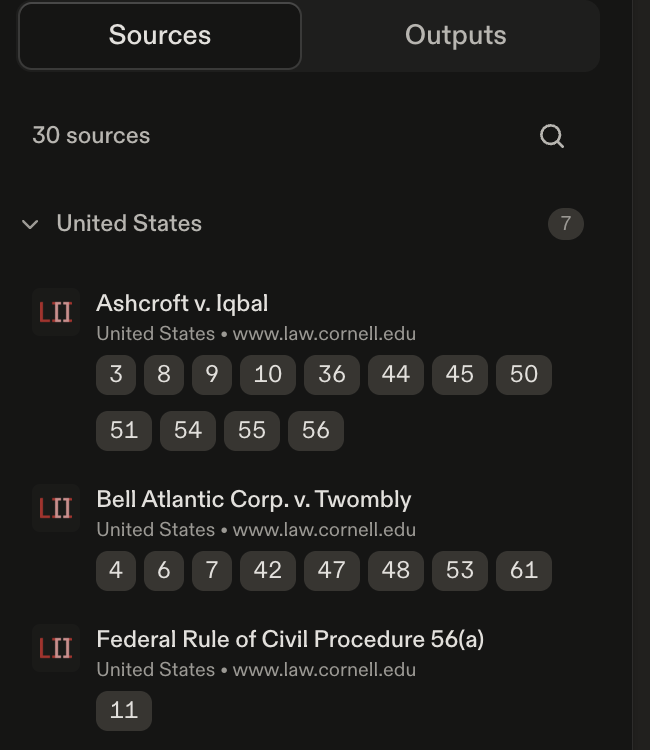
The answer’s panel reported 30 sources. It describes what Harvey worked from — which is not the same number as the statements it marked.
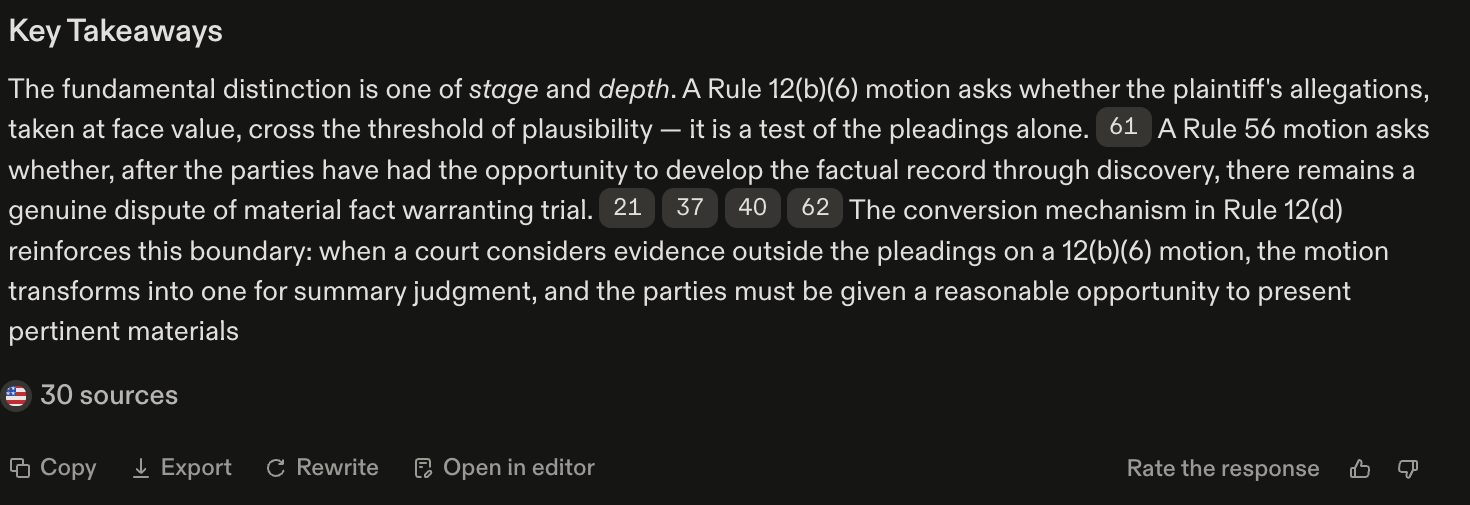
Selecting one knowledge source does not mean Harvey will cite one authority. In the practice run, one selected source led to a panel reporting 30 sources, and those 30 were not all the same kind of thing: nine named authorities were listed as cited, grouped under United States (7) and United States Wolters Kluwer (2), beneath a collapsed line reading “Researched 21 additional sources.” The inline markers, meanwhile, were numbered into the sixties, because several markers point at the same authority. Source count, authority count, and marker count are three different numbers. And none of them makes a legal proposition correct.
Source selection helps shape where Harvey looks; verification tells you whether the answer actually supports your work.
Citations
This is the part of Assistant most worth understanding, and in the practice run it worked like this.
Statements in the answer carry small numbered markers inline — in the prose, and inside table cells too. The numbers are not footnote text; they are links.
A panel beside the answer lists every source, grouped by the knowledge source it came from. Each entry gives the authority’s name, the knowledge source and provider domain it came from, and every marker number in the answer that cites it — so you can read the relationship in either direction.
Selecting a marker opens the authority itself. In the practice run, two were followed:
- A rule citation pointed at the text of Federal Rule of Civil Procedure 56 on the Legal Information Institute at Cornell, positioned at the operative sentence.
- A case citation opened the full text of the Supreme Court opinion, scrolled to the exact quoted passage, with that passage highlighted on the page.
That is genuinely useful, and worth saying plainly: a learner can get from a sentence in the answer to the specific sentence in the underlying authority in one click, without going away and searching for it. Note that it opened in the same tab, so you will need to come back.
The authorities the practice answer surfaced were the Federal Rules themselves and a handful of Supreme Court decisions — Twombly, Iqbal, Celotex, Anderson, and Matsushita. They are named here only as examples of what Harvey put on screen.
A citation is an invitation to verify, not a certificate of accuracy.
Harvey linking something proves that a document exists at that address. It does not establish that the document says what the answer claims, that it is still good law, or that it is the right authority for your question. Module 5 turns that into a workflow.
How the answer was laid out
The practice run came back as a structured document rather than a block of prose: a short framing paragraph, a heading for each motion with explanatory text and inline citations, a side-by-side comparison table whose cells carried their own citation markers, and a Key Takeaways section at the end.
Harvey also showed a research trace. A Progress panel listed the tasks it had set itself and marked them complete, and an expandable Finished in 6 steps view recorded its research steps, including the actual search queries it ran against the knowledge source. If you want to know what Harvey looked for, that trace will tell you.
A visible research trail can help you understand what Harvey looked for. It is still evidence to inspect, not proof that the resulting legal analysis is right. A trace can show a sensible-looking search that returned the wrong authority, or a thorough search that the answer then summarized loosely.
Good formatting can make an answer easier to review without making it more authoritative.
This matters more in law than almost anywhere. A confident heading structure, a clean table, and correctly formatted case names are exactly the features that make a wrong answer persuasive. Treat polish as a convenience for your review, never as evidence.
Continuing the thread
Beneath a finished answer the composer is still there, with the placeholder Ask Harvey, the Files control, and the selected source still shown as a chip. Work continues inside the thread rather than starting over.
Follow-ups worth the habit — written here as examples, not as a script, and not run in this course:
- Compare the standards in a shorter table.
- Show me which proposition each cited case supports.
- Identify issues I should verify before relying on this answer.
- Explain how Rule 12(d) connects the two motions.
Asking a follow-up is not the same as getting a correct answer to it. The second and third examples are useful precisely because they help you review, not because Harvey’s response to them would be authoritative.
Three composer controls
Deep analysis
A toggle whose tooltip reads “Enable deep analysis to add extended research and reasoning.” It is there for tasks where you want a longer research and reasoning process. It was not used in the practice run and is not tested here. It is not a correctness setting: more processing is not a substitute for verification.
Select model or writing style
A control for choosing the underlying model or a writing style. Its options are not covered in this course, and there is no single “best” choice to recommend — the default is a reasonable place for a beginner to stay.
Dictate
Users who prefer voice input can dictate into the composer.
What can I do with the answer?
These were the ordinary-user controls visible on the finished practice answer. What each one produces is not covered here, because this course did not run them.
On the answer
Copy · Export · Rewrite · Open in editor
Plus Rate the response, with thumbs-up and thumbs-down, which sends feedback to Harvey.
On the thread
Add to vault · rename · New thread · Share · Export
A further menu held a single option, Save as example. What it does was not tested, so this course does not describe its behavior.
Available in the interface; detailed sharing and export behavior is not covered here. Sharing and exporting were deliberately not activated while writing this course, because doing so would have published or downloaded something merely to see what happened. Before you share a thread, find out who receives access and whether that is appropriate for the material in it.
History
The practice thread appeared in History immediately, listed by its automatically generated title — “Differences Between Motion to Dismiss and Summary Judgment” — and marked Completed, with columns recording the surface it ran on and the source it used. History is how you return to earlier work instead of asking again.
Before you rely on a legal answer
- Does the cited authority exist?
- Does it say what Harvey says it says?
- Is it still good, current law?
- Is the jurisdiction right?
- Did Harvey omit an important authority?
- Are quotations and pinpoints accurate?
- Does your course, clinic, or workplace permit this use?
Module 5 will turn those questions into a legal-research workflow.
A polished legal answer is a starting point for verification, not the end of legal research.
One more time, on policy
Learn it for practice. Check the policy before you use it for coursework.
A public question about two Federal Rules is a good way to learn the Harvey interface. That is not the same as pasting in an assignment prompt, a draft, a research memo, or a citation problem from work you will submit. Module 3 has the rule; the short version is that submitted work has its own requirements, and you check them before you use the tool, not after.
Exercise
What should you inspect before relying on this answer?
Four true observations about the practice run:
- A. The answer contains recognizable Supreme Court case names.
- B. The answer uses a polished comparison table.
- C. Harvey provides citations and a source panel.
- D. The answer sounds confident.
Which one gives you a path toward verifying the legal propositions?
Show the answer
C.
Recognizable authorities and polished presentation can help you review an answer — they tell you roughly where you are. But the useful next step is the one that leads somewhere: following the supporting sources and reading what they actually say.
A, B, and D are all things a wrong answer can have too. Citations do not prove the answer is correct; they give you somewhere to go and check.
Going deeper with Harvey’s own training
Harvey Academy · Login may be required
Getting Started for Users
Harvey Academy learning path · Beginner · several short videos
Harvey’s own path through the core user workflows. Its stated objectives line up closely with this module: asking effective questions, iterating with follow-ups, and working with files and knowledge sources inside a conversation. It goes further than this module does into drafting and the editor.
Open on Harvey Academy (opens in a new tab)
Requires a Harvey or Academy account, and the path shows a Register button before its videos.