

AI Learning Hub › Learn AI › Self-Paced Courses › Lexis+ and Protégé at SLS › Choose Your Sources Before You Ask
Module 3 · Beginner to intermediate
Choose Your Sources Before You Ask
Model, sources and documents are three independent choices: Best Fit and named models, turning the LexisNexis source off, Web and International, and the provenance line.
By the end
- Tell the model choice apart from the source choice
- Name the content sources the account exposes
- Narrow the Lexis source by content type and jurisdiction
- Read the provenance line before reading an answer
- Run a six-point check before you submit
What is Protégé actually allowed to use for this answer?
Most advice about AI is about phrasing. In this product, the phrasing is often the least consequential thing you control. Before the prompt is even read, three separate settings have already decided what kind of answer is possible.
Choose the source before you trust the answer.
Three independent choices
These sit in different parts of the composer and they do different jobs. It is worth holding them apart, because changing one does not change the others.
Model, sources, and documents are separate choices. Switching models does not change which sources are active. Turning a source off does not change the model. Neither one attaches a document.
This course does not rank models or recommend one. There is no evidence here that model choice changes the quality of legal authority in a predictable way, and this course did not test that. The useful point is structural: the important question is not simply which model is answering. It is also what sources the answer is allowed to use.
Best Fit, the default
The model selector opened on Best Fit, marked Recommended and badged Deep Research Capable. Leaving it alone is a perfectly reasonable choice and is what the controlled example in Module 4 used.
One honest limit on what you can know: when Best Fit is selected, the answer’s own provenance line reads Best Fit. It does not name an underlying provider model. This course does not claim to know which model answered, because the interface did not say.
Named models
Below Best Fit the selector listed individual models from several providers — Anthropic, Google and OpenAI were all represented, alongside a Legacy models entry. Each carried a short descriptor such as Quick Analysis or Smarter Reasoning.
The full list observed on 28 September 2026
Best Fit Deep Research Capable — Recommended · Claude Sonnet 4.5 — Quick Analysis · Claude Sonnet 4.6 — Quick Analysis · Gemini 3.1 Pro — Smarter Reasoning · GPT-5.2 — Quick Clear, Accurate · GPT-5.5 — Fast and Capable · Legacy models.
Recorded as a dated observation, not an entitlement. Model line-ups change; read the live selector.
The descriptors are the vendor’s. Take the teaching point rather than the list: model choice is visible, and it is separate from source choice.
The LexisNexis source can be turned off
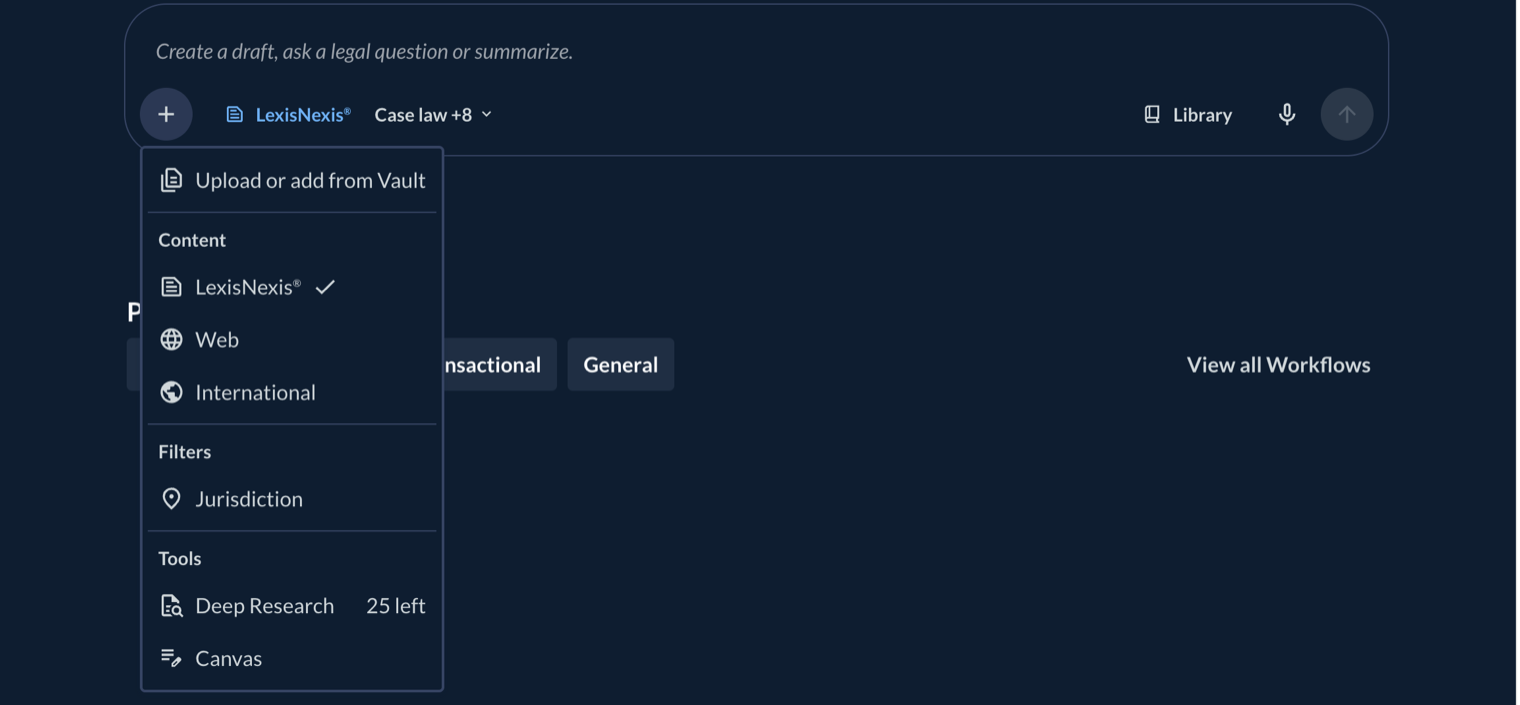
This is the single most important control on the screen, and it is easy to miss. LexisNexis® is not a permanent property of the product — it is a selectable content source, shown as a badge in the composer, and it can be switched off.
When it is off, the badge disappears from the composer. In the observed interface no warning was shown, and nothing else about the screen announced that the answer would no longer be grounded in Lexis content.
Before submitting, look at the active source badges.
That is a small habit and it is the whole defense. The composer tells you the truth about its configuration; it just does not insist that you read it.
Web and International
Web is a separate content source, listed alongside LexisNexis rather than inside it. In the controlled research test in Module 4 it was off, which was the default state on arrival.
International is a third content source. This course does not describe its coverage, because the coverage was not documented in anything read here.
What this course does not claim. We have not tested an answer with Web enabled. So nothing here says how web citations are presented, how Lexis and web material are weighed against each other, or whether combining them behaves the way the interface implies. Those are open questions, not findings.
Narrowing the Lexis source
Choosing LexisNexis is not the end of the source decision. The Lexis source is itself filterable by content type, and the composer showed the current selection as a summary badge next to the source.
The controlled test in Module 4 ran with a broad default selection covering case law — published decisions, civil and criminal content — together with codes and constitutional material, administrative code, agency decisions, Practical Guidance and treatises. You do not need that list memorized. What matters is the shape of the choice:
Narrow
Cases only.
A tighter context. Appropriate when you want judicial authority and nothing else in the way.
Broad
Cases, statutes, and secondary material.
A wider context that can bring in codes and commentary alongside decisions — useful for orientation in an unfamiliar area.
This course does not claim a particular retrieval effect from either choice, because that was not tested. The point is that the product hands you the control, and leaving it at its default is itself a decision.
One default worth looking at. In the observed content-type panel, unpublished decisions were not selected while published decisions were. Whether that suits your question is a research judgment — but it is being made for you until you look.
Jurisdiction
Alongside the content-type control sits a Jurisdiction filter. Source selection is therefore two questions, not one: what kind of material, and whose law.
That will be familiar from ordinary legal research, and it is the same judgment. A well-scoped jurisdiction is the difference between an answer about your forum and an answer about somewhere else that reads just as confidently.
Read the provenance line first
This is the product’s best affordance and the easiest thing in the world to scroll past. Every completed answer carried a small line above it recording how the response was configured.
Course diagram based on the observed SLS interface
Protégé | Best Fit | LexisNexis | Case law · Code · Practical Guidance …
- Protégé
- Which assistant produced this.
- Best Fit
- The model setting in force — the selector’s label, not necessarily an underlying provider model.
- LexisNexis
- The content source that was active.
- Content types
- The filter selection within that source, listed out.
Read this line before reading the answer.
It is the fastest way to catch the failure mode this module is about: an answer that looks authoritative because it is well organized, produced in a configuration you did not intend.
What it does not tell you. It records configuration, not retrieval. It does not show which documents were searched, what was ranked highly, or why a particular case was chosen. And in the controlled example no document was attached, so this course makes no claim about how attached documents appear in that line.
A check before you submit
Six questions, and all six are answerable by looking at the composer.
What model is selected? Best Fit, or something you chose on purpose.
Is LexisNexis active? The badge is either there or it is not.
Is Web active? A different question from the one above, with a different answer.
What content types are selected? Including whether the default excludes something you want.
Is the jurisdiction appropriate? For the question you are actually asking.
Did I attach a document or Vault source? And did I mean to?
Make the source choice deliberate rather than invisible.
Exercise
What changed before the prompt changed?
In each pair, the question stays the same. Something else moved.
A and B. The same question asked with LexisNexis active, and then with LexisNexis inactive. Is that merely a model change?
Show the answer for A and B
No. The source context changed. The model is untouched; what moved is the body of material the answer may draw on. With the Lexis source off, whatever comes back is not grounded in Lexis content — and the composer will have said so quietly, by dropping the badge.
C. Same model, same Lexis source, but Web is now enabled.
Show the answer for C
Source context changed again — this time by addition rather than subtraction. What that does to the shape of the answer is something this course has not tested and does not claim.
D. Same model and the same sources, but a Vault document is attached.
Show the answer for D
Document context changed. The third layer. Neither the model nor the content sources moved; the answer now has material of yours available to it.
Three layers, three independent switches. Knowing which one you moved is most of configuration literacy.