

AI Learning Hub › Learn AI › Self-Paced Courses › Gemini Notebook: Working with Sources You Choose › Know What Kind of Source You Are Citing
Module 6 · Intermediate
Know What Kind of Source You Are Citing
A citation tells you where a sentence came from inside the notebook. Deciding what that source is worth is the second half of verification, and the notebook does not do it for you.
Module 4 covered the first question to ask of a citation: does the source support the claim? This module is about the second, which the notebook cannot answer for you: what kind of source is this?
What a corpus looks like after a few ordinary steps
The notebook below began as two Stanford pages. One upload and one accepted research import later, it held eight sources.
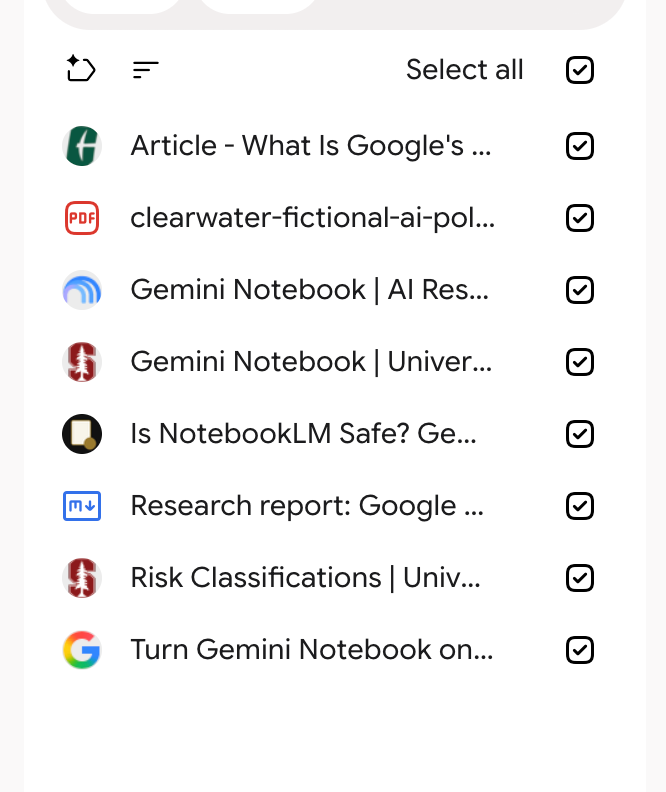
Nothing here is concealed. The list is right there, every item is visible, and the favicons differ. But the list is flat and alphabetical, so a Stanford policy page, a consultancy blog post, and a document the model wrote sit as neighbors with equal billing. There is no column for provenance and no grouping by type.
The generated source
The entry reading Research report: Google… was written by the model during the web-research step in Module 5. Once imported it behaves like any other source: it is enabled, it counts toward the total, and later answers can cite it.
In testing, a subsequent answer did cite it — with the same numbered chip, in the same visual style, as the citation beside Google’s own privacy documentation. Clicking through worked exactly as it should: the popover opened, the source panel scrolled to the passage. The verification chain was intact. It simply terminated in a document whose own reference list pointed at third-party commentary.
Citation chrome tells you where a statement came from inside the notebook. It does not tell you whether that source deserves the authority you are about to give it.
This is not an argument against generated summaries, which can be genuinely useful for orienting yourself in unfamiliar material. It is an argument for knowing which of your sources is one.
Exercise: classify the list
Work through the eight entries in the screenshot above and assign each to a category. Where the screenshot does not give you enough to decide, say so rather than guessing — investigate is a legitimate answer and often the honest one.
| Category | What it covers |
|---|---|
| Authoritative or original | The institution or vendor whose rules, product, or record is in question, speaking for itself. |
| Secondary | Someone else’s description or analysis of that material. Can be excellent; is not the thing itself. |
| AI-generated | Text a model produced, including research reports and chats that became sources. |
| Local or user-provided | A file you uploaded. Its authority is whatever the underlying document’s authority is. |
| Investigate | You cannot tell from the title and icon. Open it and find out. |
How the eight sort out
The two Stanford entries and the Google help page are authoritative for their own rules and product. The uploaded PDF is local, and in this case it was a fictional document written for the test, which is a reminder that local says nothing about reliability. The research report is AI-generated. The remaining three need investigating: two of them have names implying an institutional source that the domain did not bear out, and one is independent commentary that may or may not be good.
If your instinct was to treat the Stanford pages as the only sources worth citing, test that. A vendor help page is the right source for what the vendor’s product does; a Stanford page is the right source for what Stanford permits. Authority is relative to the question.
Keeping the set honest
Source hygiene is a plain idea: keeping track of what entered the notebook, where it came from, and whether it deserves the role you are giving it. It costs a minute at the end of a working session. Open the Sources panel, read down the list, and ask of anything you do not recognize how it got there.