

AI Learning Hub › Learn AI › Self-Paced Courses › Gemini Notebook: Working with Sources You Choose › Use a Notebook from Gemini
Module 8 · Intermediate
Use a Notebook from Gemini
The same notebook, reached through the Gemini app instead of the notebook workspace, and what changes about your ability to check an answer when you do.
A notebook can also be reached from the Gemini app. In the Gemini sidebar there is a Notebooks section listing the same notebooks, and opening one there opens the same object: in testing, the URL at gemini.google.com/notebook/ carried the identical notebook identifier as the one at notebook.google.com/notebook/.
That is worth being precise about. This is one notebook with two front ends, not a copy. Sources added in one appear in the other.
What changes is the verification path
The two surfaces do not give you the same ability to check an answer. In the notebook workspace, as Module 4 showed, a numbered citation opens a passage and scrolls the source panel to the supporting text. Asked a comparable question through Gemini, the answer was correct and cited — but cited differently.
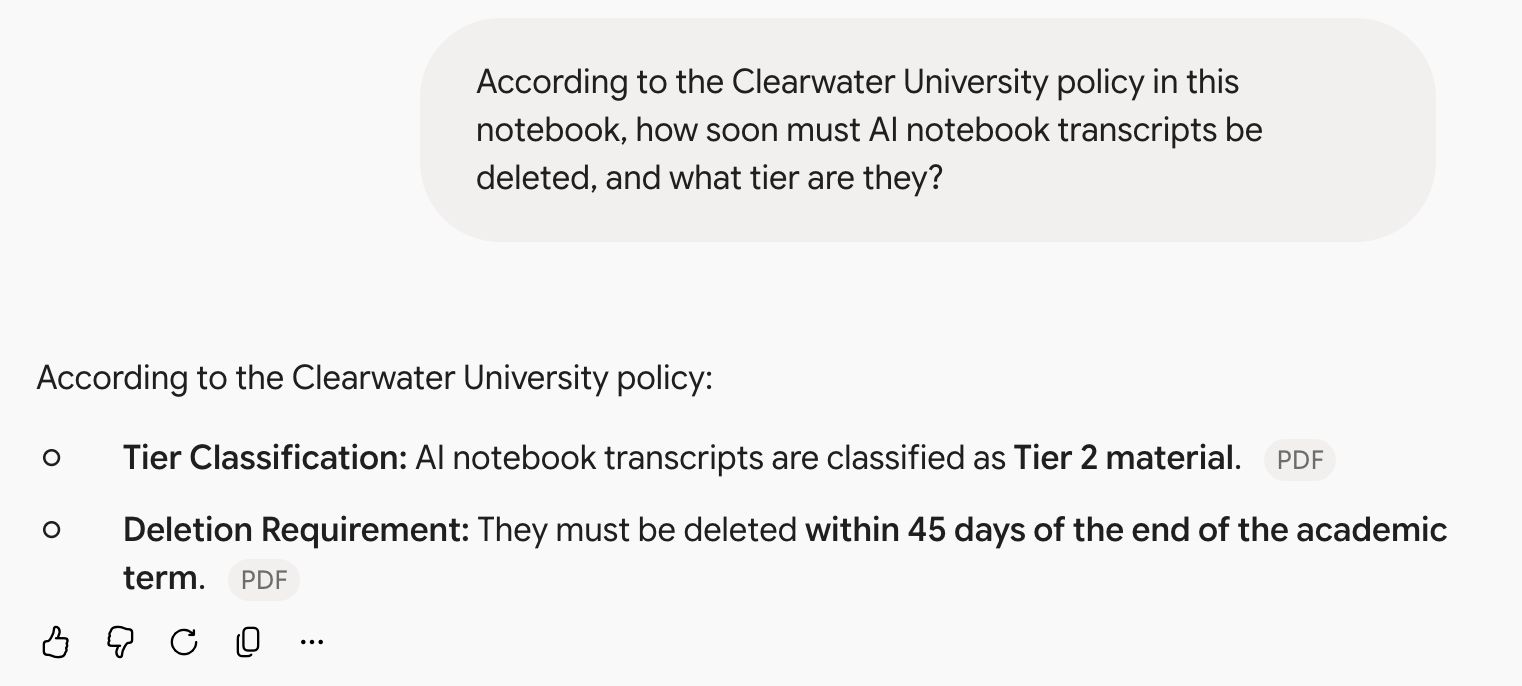
Clicking the chip gave the document’s title. It did not open the passage, and no equivalent route to the supporting sentence was found. An earlier test on a web source produced the same behavior with a chip reading HTML, so the pattern is that the chip names the file type.
| Notebook workspace | Gemini app | |
|---|---|---|
| Citation marker | A number | A gray chip naming the file type |
| Clicking it | Passage popover, plus the source panel scrolled to the text | The document title |
| Source panel | Always present | Not present in the chat view |
| Where the chat lives | In the notebook | Becomes a conversation in the Gemini app |
None of this makes the Gemini answers wrong; the one tested here was accurate and properly attributed. The observed difference is in how far you can get toward the supporting sentence without leaving the answer. If the task is checking something carefully, the notebook workspace is where the tools are.
Exercise: the same question, both ways
Pick a question your notebook can answer from a single source. Ask it in the notebook workspace, then ask it again through Gemini with the same notebook open. For each, record three things:
- How do I see which source this came from?
- How far can I get toward the exact supporting passage, and how many clicks does it take?
- If I had to defend this sentence to someone, which version would I rather be looking at?
What the exercise is for
Not to pick a winner. The Gemini surface has real advantages — it is where your other work already is, and it can reach notebooks alongside everything else in the app. The point is to know which affordances you gave up by working there, so you can come back to the notebook workspace at the moment checking actually matters. Module 9 covers the other thing worth knowing about working this way.