

AI Learning Hub › Learn AI › Self-Paced Courses › Lexis+ and Protégé at SLS › Documents: Session Uploads, Vault, and What Persists
Module 7 · Intermediate
Documents: Session Uploads, Vault, and What Persists
The same file has two destinations in Protégé: three kinds of document context, what a session upload looked like, what a Vault is, and what persists according to whom.
By the end
- Tell a session upload from a Vault document
- Recognize a third kind of object the product creates for you
- Read what the provenance line does and does not record
- Keep each retention statement tied to its source and scope
- Keep storage capability apart from permission
When you give Protégé a document, where does it live and how long does that context persist?
The composer offers one entry — Upload or add from Vault — and that single phrase hides a real architectural choice. What happens next depends on a button you press afterward.
“Upload” is not one thing. The storage context matters.
The same file, two destinations
Upload a file and the dialog offers two ways to finish. They are not variations on a theme; they produce different objects with different lifetimes.
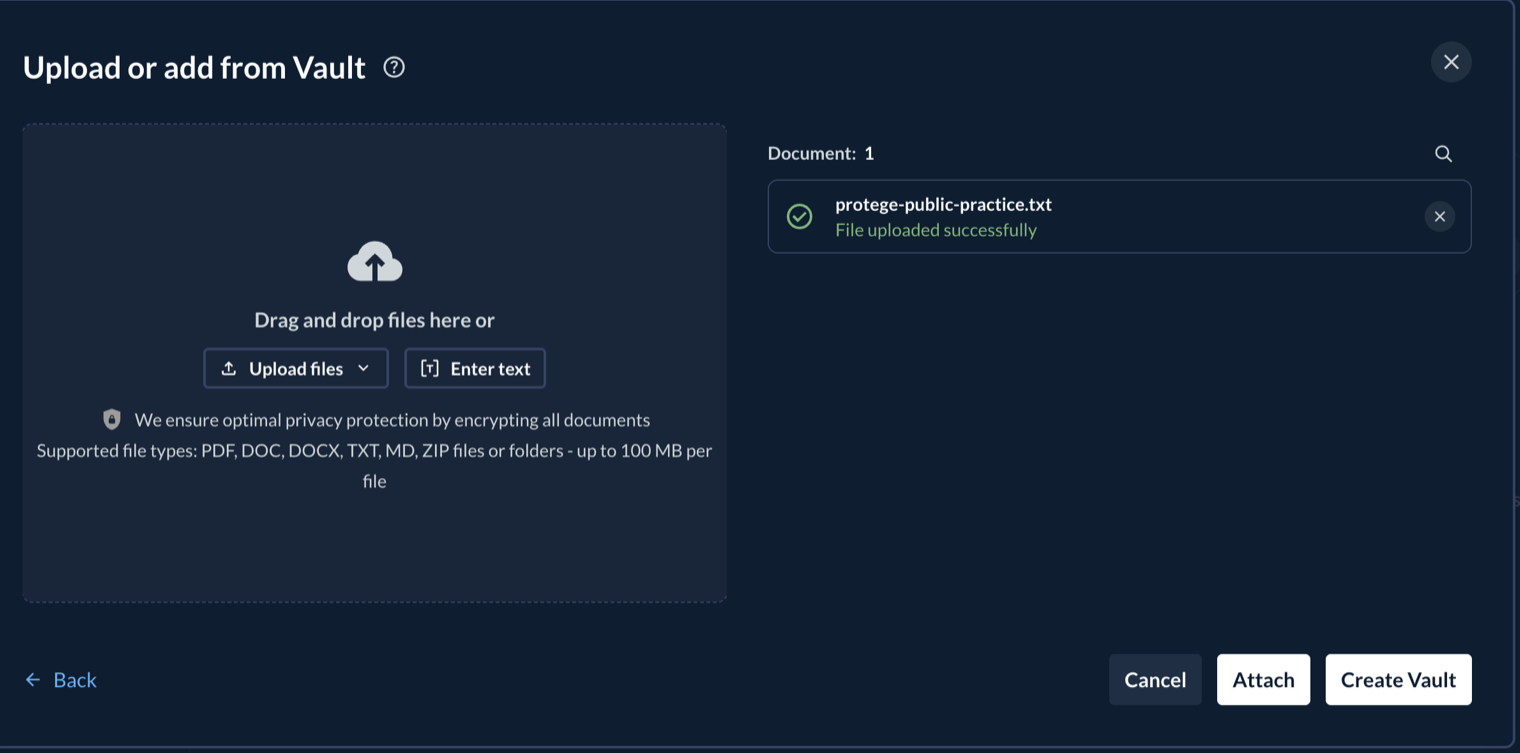
That screen is the module in one picture. Attach gives the document to this conversation. Create Vault puts it in a named store you manage. Same file, same upload, different architecture.
Three kinds of document context
Those three do not share storage, lifetime, deletion behavior or downstream use, and this course does not treat them as interchangeable. The third one is the easiest to acquire without noticing.
What a session upload looked like
A fictional practice note, attached rather than vaulted, then a single prompt asking for a summary and for what was missing.
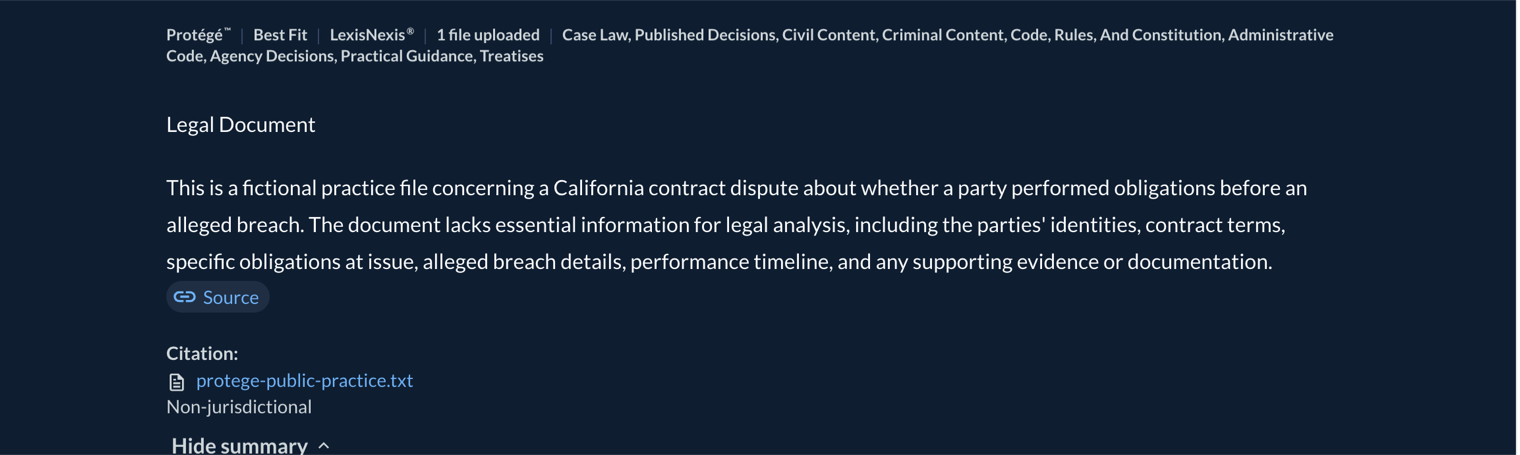
Two details are worth taking away. The provenance line gained “1 file uploaded” — so the answer records that a document was in play. And the document was cited like a source, by filename, tagged Non-jurisdictional: the product marks your material as something other than legal authority.
What the provenance line does not tell you. When the same file was supplied from a Vault instead, the line read “1 file uploaded” again — identically. It records that a document was attached, not where that document lives. If the distinction matters to you, the provenance line will not settle it.
What a Vault is
A Vault is a named, managed store. Creating one asks for a name and an optional description before anything is made, and once it exists the composer gains a Use an existing Vault selector that lists your Vaults and their documents by upload date.

The management page gives a creation date, a document table with a Sub-Vault column, controls to create a sub-Vault and to delete selected documents, and an options menu offering Rename Vault and Delete Vault. Deleting asks for confirmation and states the consequence plainly — deleting the Vault deletes its documents.
Choose Vault when persistence and reuse are part of the workflow; do not use it merely because the button is available.
A one-off question does not need a Vault. A body of public research you will come back to across weeks might. Some Workflows also expect a Vault document as their input, which Module 8 comes to.
On capacity, sizes and file types
This is a place where the product’s own sources disagree, and it is worth knowing rather than resolving.
LexisNexis’s current sources give conflicting Vault-capacity figures, so this course does not rely on a specific maximum. The help documentation and a more recent release describe very different limits.
The same is true of file sizes and types. The help page lists PDF, DOC, DOCX and TXT at one size limit; the live upload dialog on 28 September 2026 listed PDF, DOC, DOCX, TXT, MD and ZIP, up to 100 MB per file, and the Vault panel on the same day listed a slightly different set again. Read the limit on the screen you are actually using, and treat any figure in a tutorial — including this one — as a snapshot.
What persists, according to whom
Retention statements come from different places, cover different things, and were written at different times. Keeping them apart is the whole skill.
| What | Source | What it says |
|---|---|---|
| Session uploads | LexisNexis help documentation | Non-Vault uploads are automatically purged at the end of a session. The live interface states no retention period at all. |
| Vault documents | LexisNexis help documentation | Saved until you decide to delete them. Again, the live Vault page shows no retention language. |
| Web content | Live in-product notice | Queries are sent to the selected model, with zero-retention language scoped to Web content — not to everything else. |
| Customer data and AI interactions | Vendor statements | Customer data is not used to train public AI models; separately, identifiable information is described as removed from certain interactions used to improve performance. |
This course did not verify deletion. LexisNexis documents that session uploads are purged. Nobody here inspected a backend, and you should not read “documented” as “confirmed.”
One pair of statements in that table deserves separating carefully, because they sound like the same reassurance and are not:
“Not used to train a public model” and “not retained or used in any way” are not equivalent statements.
Noting that is not accusing the vendor of contradicting itself. The two claims have different scopes and can both be true at once. The error would be collapsing them into a single sentence like “Lexis never stores your data,” which no source here supports.
And none of it is permission
Product security does not answer whether you are permitted to provide the material.
Encryption, purge schedules and a delete button are facts about the product. Before any real clinic document, client document, institutional record or confidential workplace material goes near it, the questions are the ones Module 2 set out: authorization, supervisor direction, confidentiality, and the rules of professional responsibility. A Vault is a good place to keep material you are already allowed to use.
Exercise
Where should this document live?
Five situations.
A. A fictional one-off practice note you need for a single conversation.
Show the answer for A
A session upload may fit. Attach it, use it, and let it go. Creating a Vault for something you will never open again is just state you now have to manage.
B. A public research packet you deliberately want available across future work.
Show the answer for B
A Vault may fit, if reuse is genuinely part of the workflow. It gives you a named store, a document list, and a delete control you operate.
C. A clinic client memo.
Show the answer for C
Stop. Storage capability does not answer authorization. The question is not which button to press; it is whether the material may be provided at all, and that is resolved outside the product.
D. A drafting prompt unexpectedly opens Canvas and creates a Draft.
Show the answer for D
Recognize that persistent state may have been created without you asking for it. Look at what object exists and where it sits, rather than assuming the turn produced only chat.
E. A learner sees “zero retention” beside Web content and relaxes.
Show the answer for E
Do not apply that statement automatically to Vaults, Canvas or anything else. It was scoped to Web content where it appeared. Scope is the whole content of a retention claim.