

AI Learning Hub › Learn AI › Self-Paced Courses › Lexis+ and Protégé at SLS › Skills, Workflows, and Metered Work
Module 8 · Intermediate
Skills, Workflows, and Metered Work
When a structured Protégé tool beats an ordinary prompt: the Skills library, who provided it, the plan presented for review before work ran, and what these tools consume.
By the end
- Tell a prompt, a Skill and a Workflow apart
- Check who provided a Skill, not just what it does
- Recognize the plan-and-confirm step before execution
- Notice when a tool consumes a limited allowance
- Keep a Skill’s availability apart from your permission to use it
When should you use a structured Protégé tool instead of an ordinary prompt?
Most of this course has been about the conversation. Protégé also offers Skills and Workflows, which are a different shape of thing.
A prompt asks for an answer. A structured tool may define a process.
Take that carefully. It does not mean the structured tools are autonomous, or that they do work you could not otherwise request. It means the steps are named, shown and tracked rather than left implicit.
The Skills library
Skills live in their own area, badged Preview, described as “designed for multi-step tasks with visible planning and progress.” They are grouped by audience.

A separate Skills library view adds filters, and one of them is the important one.
Check who provided it
The library filters by Provided by, and the observed options were LexisNexis, Claude, Faculty and Custom skills. Individual cards carry a provider badge. Several of the student-facing and practice-facing Skills were Claude-provided rather than LexisNexis-authored.
Check who provided the Skill as well as what the Skill promises to do.
A Skill appearing inside Protégé does not mean LexisNexis wrote it. That is ordinary product literacy rather than a warning: it tells you whose judgment shaped the task definition, and who to think about when the output surprises you.
What running one actually looked like
One Skill was run for this course: Case Brief, on Oasis West Realty, LLC v. Goldman, 51 Cal. 4th 811 (2011) — public authority already used elsewhere in this course, with no document uploaded.
It did not open a form. It opened an intake conversation, asking which case, which brief format, and whether to use a “drill-me” mode where you state the holding first or an “explain-to-me” mode where it writes directly. Only after that did the interesting part happen.
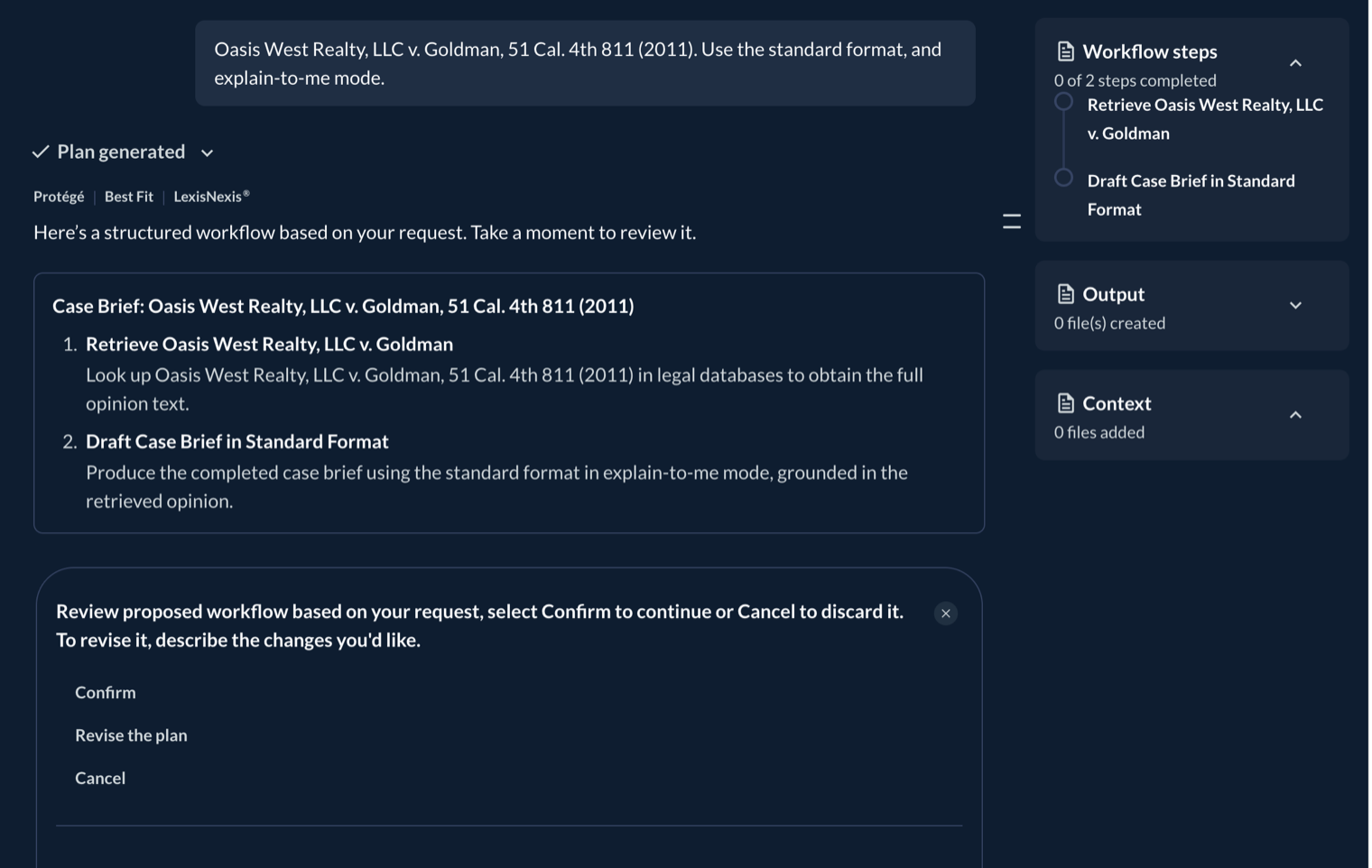
This answers a question the course could not settle earlier. There is not merely visible progress; there is a plan presented before execution with an explicit gate — Confirm, Revise the plan, or Cancel. The right rail declares in advance how many steps there are, how many files the run may create, and what context it has.
- Visible plan and progress
- The product shows the stages and ticks them off as they complete.
- Approval gate
- A separate confirmation before execution begins. Observed here for this Skill, on this date.
This course saw that gate on one Skill. It does not claim every Skill or every Workflow presents one, and the first turn of this same Skill ran without a gate because it was only asking intake questions.
And then it made a file
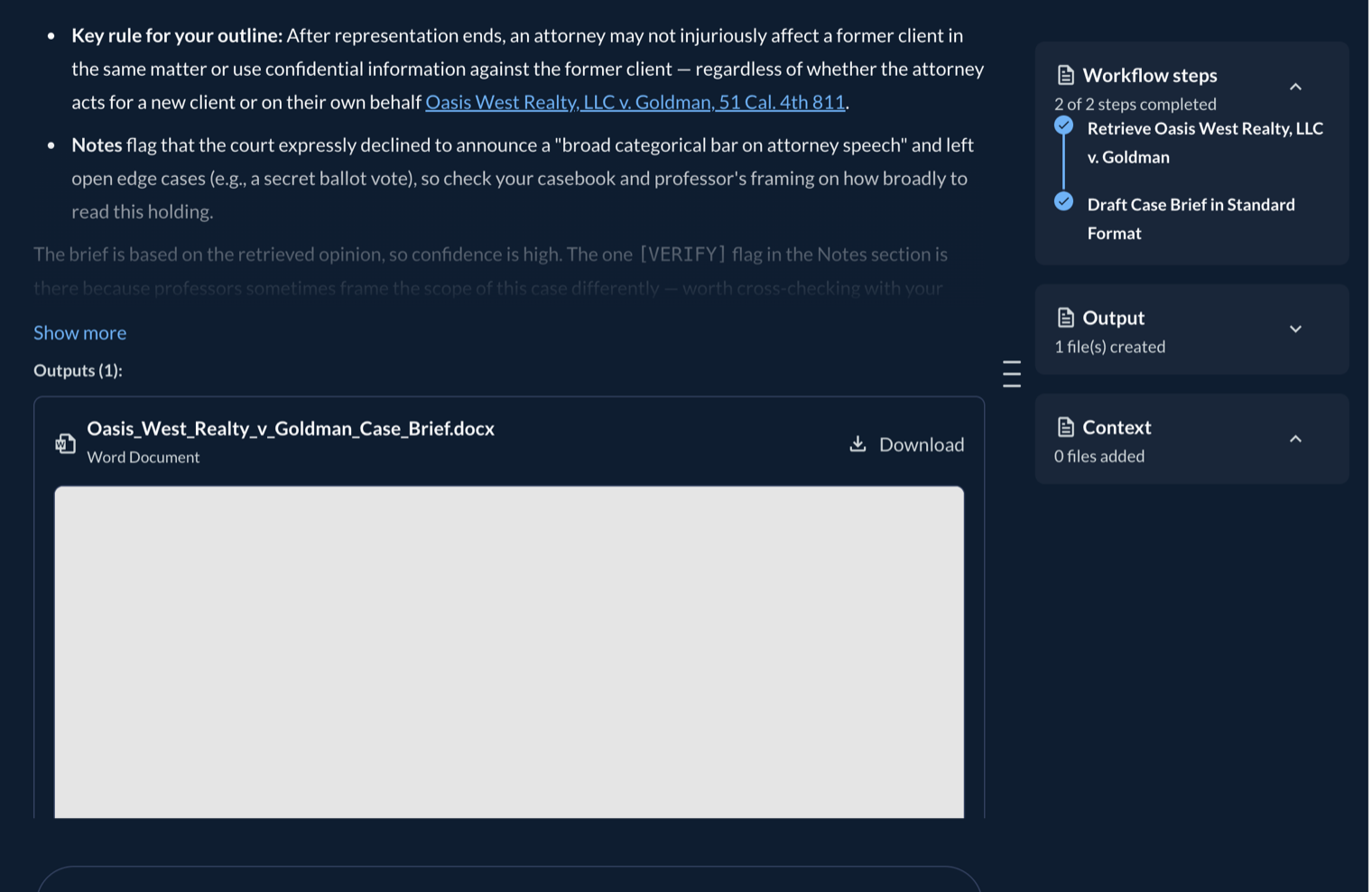
The run produced a .docx file attached to the conversation — the same pattern as the Canvas Draft in Module 6, and the third kind of persistent object in Module 7. The right rail had told us to expect it.
Two things in the output are worth noticing, neither of which is a judgment about quality. Its citation to the case was linked, so the verification path from Module 5 is available. And the Skill flagged its own uncertainty, telling the reader that the court had declined to announce a broad rule and to check your casebook and professor’s framing.
That is a study aid pointing back at the human authority in the room. It is also a reminder that a Skill’s output is shaped by whoever wrote the Skill.
Structured tools are metered

Deep Research carries its own count in the + menu. Running the one Case Brief decremented the Skills allowance by one, so the meter is per run.
Before using a structured tool, check whether it consumes a limited allowance.
This course does not suggest ordinary conversation draws on the same allowance — that was not tested — and it does not publish the counts it saw as though they were universal entitlements. Read your own.
Workflows
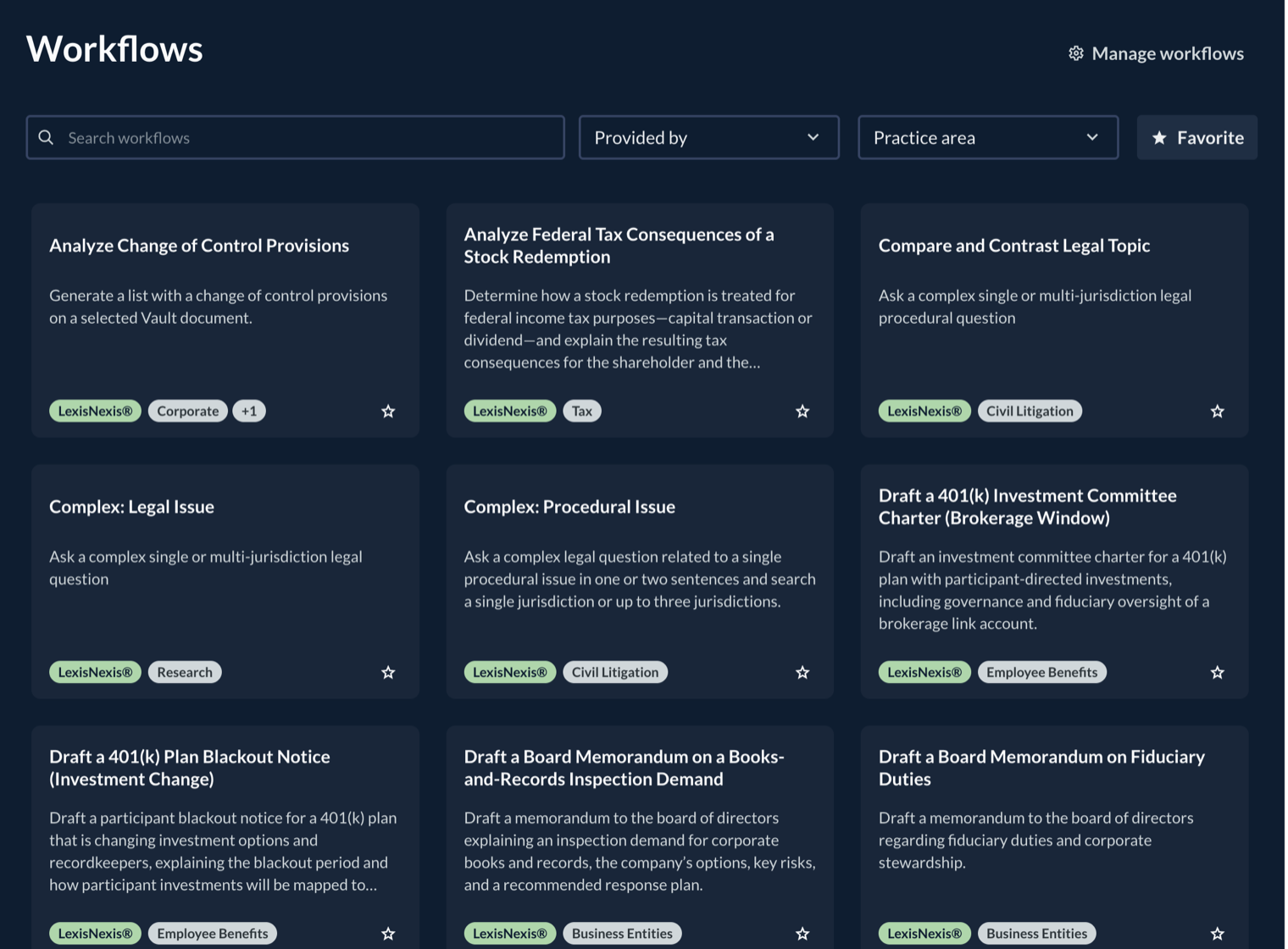
Workflows are organized differently from Skills: filtered by Provided by and Practice area, favoritable, with a Manage workflows control. Every card observed carried a LexisNexis® badge and a practice-area tag. Several are explicitly drafting tasks, and at least one states that it operates on a selected Vault document — a direct dependency on Module 7.
- Skill
- A structured, reusable task, grouped by who it is for, and in the observed account provided by LexisNexis, Claude, Faculty or a custom author.
- Workflow
- A more predefined, process-oriented sequence, organized by practice area, sometimes expecting a Vault document as its input.
No Workflow was run for this course, so nothing here describes what one produces.
Other structured tools
Two more appear in the + menu under Tools, and this course leaves both largely alone.
Deep Research
A tool you add to a conversation, not a separate product.
Metered, with its own remaining-use count. The default Best Fit model is badged Deep Research Capable. Not run for this course, so nothing is claimed about what it produces or how complete its research is.
Canvas
A drafting surface the product may open for you.
Observed once, invoked automatically by a drafting request, producing a persistent Draft. Its feature set, revision workflow and retention rules were not tested, and it is not known whether every drafting task uses it.
Availability is not permission
The student-facing Skills observed included Exam Forecast, Outline Builder, Legal Writing, IRAC Practice, Case Brief, Cold Call Prep, Socratic Drill, Flashcards and Bar Prep Questions. Faculty-facing ones included Syllabus Builder and Topic Discovery.
A Skill is a capability, not permission.
A “Student” heading is a statement about who the vendor built the tool for. It does not override your course policy, your exam rules, or the terms of a particular assignment — and several of those names sit close enough to graded work that the question is a live one. Module 2 is where it gets answered.
Exercise
Prompt, Skill, Workflow, or something else?
Five situations.
A. You need one explanation of a doctrine.
Show the answer for A
An ordinary Protégé prompt may be enough. Structure costs something — setup, and possibly a metered allowance. A single question does not need a defined process.
B. You want a structured case brief in a predefined format.
Show the answer for B
The Case Brief Skill may fit. That is what a Skill is for: a task someone has already shaped, with a plan you can review before it runs. Check who provided it, and verify the authority it returns.
C. You need a predefined multi-step practice-area process involving a Vault document.
Show the answer for C
A Workflow may fit, if one matches the task — some are written to operate on a selected Vault document, which means the Module 7 decision comes first.
D. You notice Exam Forecast sitting under Student Skills.
Show the answer for D
Availability does not answer whether its use is allowed in your course. The menu is not a policy document, and the vendor is not in a position to write one for Stanford.
E. You see a usage counter beside a structured tool.
Show the answer for E
Check the remaining allowance before spending it on experimentation. Running one Case Brief for this course decreased the count by one. If you have a real task coming, do not burn the allowance finding out what the button does.