

AI Learning Hub › Learn AI › Self-Paced Courses › LexText at SLS › Verify: Hallucination Guard and Independent Verification
Module 7 · Intermediate
Verify: Hallucination Guard and Independent Verification
What the verification report takes in and gives back, reading it without treating it as a verdict, and what it did not check.
By the end
- Describe what Hallucination Guard takes in and what it gives back
- Keep five different verification questions apart
- Read a verification report without treating it as a verdict
- Follow a flagged citation to the authority itself
- Say what the tool did not check, and what it got wrong
- Explain why a verification feature does not end your obligation
What does Hallucination Guard actually verify — and what still belongs to you?
Every module so far has produced text with law in it. Case Assistant cited our documents. Legal Research returned authorities. Guided Drafter proposed defenses. Complaint Analyzer listed cases beside each element. At no point has anything asked the one question a court will ask first: is this citation real, and does it say what you say it says?
LexText ships a tool for exactly that. This module runs it against a test this course built and scored in advance — and the result is more interesting than either “it works” or “it doesn’t.”
Verification is its own workflow
Hallucination Guard is the fourth item in the matter sidebar, labeled Hallucination Guard (Beta). It is not a toggle on generation and not a setting inside another tool. It is a place you go with a document that already exists.
The start state, word for word
Eyebrow VERIFICATION. Description: “Check citations, quotations, and cited propositions against the source authorities.” Then an upload panel headed Review a document — “Drag and drop a legal document here, or choose a file” — a Choose document button, and the accepted types PDF, DOCX, DOC, or TXT. Underneath: “The review will be saved automatically to” the current matter. Below that, Previous reviews, empty: “Completed reviews will appear here.”
Observed in the SLS LexText account, 25 September 2026.
Three things follow from that screen. It takes a document, not a task or a draft in progress. Every label is singular, so plan on one file at a time. And it is matter-scoped: the review saves itself into whichever matter you are in, and joins a per-matter list.
It also has a place in the drafting flow. Module 5 ended with the Answer workflow’s final button reading Next: Hallucination Guard — LexText puts verification immediately after drafting. This course did not press that button, so nothing is claimed about what it carries across.
One more observation worth having before you rely on the training: the Resource Center does not cover this tool. None of its ten walkthroughs is about Hallucination Guard, and the FAQ has no section for it. Like Doc Search, it is newer than its own documentation.
What it says it checks
Its own description names three things, and they are genuinely different questions:
Citations
Is the authority real?
And is the reporter, volume, and court information right?
Quotations
Do the quoted words match?
Word for word, against the source text.
Cited propositions
Does the authority support the sentence?
The hardest of the three, and the most consequential.
Our controlled exercise
Rather than review something this course had generated, we wrote a one-page document for the purpose: AI Learning Hub Practice — Citation Verification Exercise. It carries a banner announcing that it mixes accurate and deliberately inaccurate citations, describes no dispute, and names no party. Five numbered statements, each asserting a proposition and citing an authority.
Two design decisions matter for reading the result.
The answer key came first. Every item was checked against a primary source before the document was written — the statute against California’s official legislative site, Twombly against the bound United States Reports, and the California elements against Stanford’s own California Supreme Court archive, with the reporter pinpoint corroborated separately against a published federal opinion that cites it. No error was designed from memory. That is the only way a score means anything.
Currentness was left out on purpose. No statement claims an authority remains good law, because this course ran no citator. Testing a tool against a question it never offered to answer would not be fair.
The five statements
Three are sound and two are not. Before reading on, decide which you would flag.
- California breach-of-contract elements include existence of a contract, plaintiff’s performance or excuse, defendant’s breach, and resulting damages. Oasis West Realty, LLC v. Goldman, 51 Cal. 4th 811, 821 (2011).
- California Civil Code § 3301 provides: “No damages can be recovered for a breach of contract which are not clearly ascertainable in both their nature and origin.”
- Factual allegations must be enough to raise a right to relief above the speculative level. Bell Atlantic Corp. v. Twombly, 550 U.S. 544, 570 (2007).
- Contract damages must be “reasonably ascertainable in both their nature and amount.” Cal. Civ. Code § 3301.
- ExampleCo Analytics, Inc. v. DemoSoft Systems, LLC, 999 F.4th 123, 130 (9th Cir. 2026), holds that any delay in delivering contracted software automatically constitutes a material breach.
Show the answer key
1 is sound. The case is real, the pinpoint is right, and page 821 states those elements, quoting Reichert v. General Ins. Co. (1968) 68 Cal.2d 822, 830.
2 is sound. That is the exact current text of § 3301, unaltered.
3 has the wrong pinpoint. The proposition is genuine and the sentence really is in Twombly — at 555. Page 570 is a real page of the same opinion, carrying “plausible on its face” instead.
4 misquotes the statute. § 3301 says clearly ascertainable in their nature and origin, not reasonably ascertainable in their nature and amount. Two words changed inside quotation marks.
5 is fabricated. No such case. The Federal Reporter’s fourth series began at volume 1 in 2021, so volume 999 does not exist — and the parties are this course’s own invented companies.
Item 3 is the sharp one. A tool that only checks whether a case exists will pass it. So will a tool that only checks whether the sentence appears somewhere in the opinion. Catching it requires knowing which page.
What Hallucination Guard caught
One review, one document. The report splits into Citation review for cases and Statute review for statutes, each with its own count line.

Scored against the key:
Item 3 — wrong pinpoint
Caught, exactly.
“Twombly is a valid case, but the quoted proposition is not accurate as used here. The phrase ‘raise a right to relief above the speculative level’ appears at 550 U.S. 544, 555, not 570.”
Item 4 — misquotation
Caught, exactly.
“Statement 4 misstates it. The statute refers to damages being clearly ascertainable in their nature and origin, not reasonably ascertainable in their nature and amount.”
Item 5 — fabricated case
Caught, and carefully.
Authority found: Not found. Result: Needs review. Support: Not assessed. It did not declare the case invented; it declined to vouch for it.
Item 1 — sound citation
Flagged anyway.
Marked Issue found and Does not support — a false alarm on a correct citation, for a reason worth understanding.
Every planted error was found, and two of the three were diagnosed to the word. That is a real result, and the pinpoint catch in particular is not easy.
But look at the count line in the report: 0 confirmed, in both tables. Nothing was given a clean bill of health, including the two statements that deserved one.
Where the false alarm came from
Item 1 is worth slowing down on, because the tool’s reasoning is not nonsense. Its explanation:
On the correct citation
“Does not support: The validated case exists, but it does not stand for the elements of a California breach-of-contract claim. Its holding concerns anti‑SLAPP and an attorney’s duties to a former client.”
Observed in the SLS LexText account, 25 September 2026.
The second sentence is true. Oasis West is an anti‑SLAPP case about a lawyer and a former client. What the tool did was compare our proposition against what the case held — and on that test it fails, because no court holds that a contract has four elements.
That is the wrong test. A citation to page 821 is a claim about what appears at page 821, and courts routinely cite Oasis West at exactly that page for exactly this list. The distinction between a case’s holding and a proposition it states is a real one that lawyers care about — the tool reached for it and applied it in the wrong place.
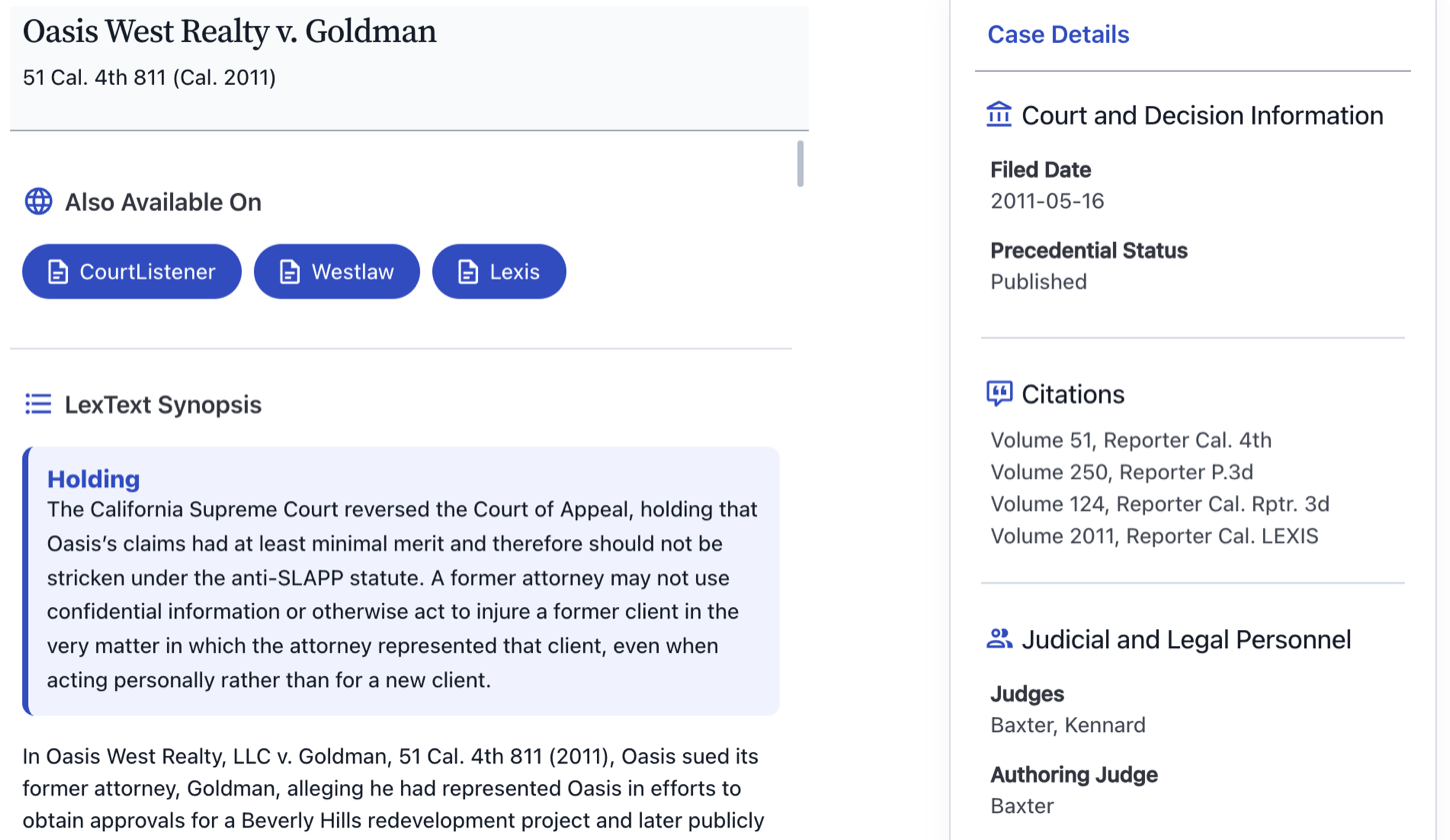
You can see the substitution in the product itself. Open the case from the report and the first thing LexText shows is its own Holding summary, and the report’s explanation tracks that summary closely — anti‑SLAPP, duties to a former client. It appears to have checked the proposition against a summary of the case rather than against the page cited.
Follow the authority
Which is the whole point of source links, and Hallucination Guard’s are better than the course has seen elsewhere. They are also of two different kinds.
A case citation
Opens LexText’s internal CaseViewer.
The full opinion, with reporter star pagination in the text. It also offers the same case on CourtListener, Westlaw and Lexis. But it opens at the first page of the case, not the page cited, and nothing is highlighted.
A statute citation
Opens the official source.
The California Legislative Information site, deep-linked to the section. The whole provision is on screen, so the quotation settles itself at a glance.
The star pagination is what makes the case link useful. Scroll to the marker for the page you were given and you can read what is actually there. Doing that for Item 1 finds, right after *821, the sentence the report said the case does not stand for:
“And the elements of a cause of action for breach of contract are (1) the existence of the contract, (2) plaintiff’s performance or excuse for nonperformance, (3) defendant’s breach, and (4) the resulting damages to the plaintiff.”
Two minutes of scrolling settled a question the report had answered wrongly. A link is an invitation, not a proof. The report is right that you should check the flagged items; it is also true that checking them is how you find the flag that was mistaken.
Five different verification questions
The reason a single verdict is not enough is that “verify the citation” hides five separate questions. Keeping them apart is the durable skill in this module.
1 · Existence
Is the authority real?
Handled well in our run — the invented case came back Not found, without overclaiming.
2 · Location
Is the material at the page cited?
Handled well — and this is the one most people skip. It named the right page.
3 · Quotation
Do the quoted words match?
Mixed. The prose caught the misquoted statute precisely, but the report’s own Quotation review column read “source-text check required” for both quotations — including the accurate one.
4 · Support
Does the authority support the sentence?
Weakest. This is where the false alarm happened, and where a wrong answer is hardest to notice.
5 · Currentness
Is it still good for this?
Not offered at all. See below.
What Hallucination Guard does not establish
It is not a citator. Nothing in the report or the CaseViewer showed negative treatment, overruling, citing references, or anything resembling a Shepard’s or KeyCite signal. The Case Details pane lists a filing date, parallel citations, the judges, and a Precedential Status of Published.
“Published” is not a currentness signal. It means the opinion was designated for publication when it was filed. It says nothing about whether the case has since been distinguished, limited, superseded, or overruled. Reading it as reassurance is the mistake this callout exists to prevent.
Two other things the run does not establish. It says nothing about documents with many more citations than five, or about any authority outside California and federal civil procedure. And a clean result on one document is not a property of the tool — this is one review, not a measurement. What generalizes here is the shape of the questions, not the score.
Independent verification is still yours
You do not have to take that from this course. Module 2 quoted LexText’s own answer as a policy matter, before anything had been run. It is worth reading again now that there is a result to hold it against:
“Do I need to verify citations? Yes. Per the acceptable use policy, independently verify all citations for accuracy before relying on them in any filing or submission.”
LexText Resource Center FAQ, under Legal Research, read 25 September 2026. The phrase “the acceptable use policy” is not a link, and this course could not locate the referenced document through ordinary navigation, so it is quoted as the FAQ has it.
That is the vendor’s own instruction, written before any of this was tested, and our run shows why it holds in both directions. A flag is not a finding: one of the four flags was wrong. And an unflagged citation is not a cleared citation: the report confirmed nothing at all.
A verification tool is part of the review process, not a substitute for the reviewer.
Used well, it is genuinely valuable. It read a page-level error out of a Supreme Court citation faster than most readers would, and it found two words changed inside a statutory quotation. Treat it as a reader who catches things you might miss, whose catches you then check — not as a gate that has been passed.
Different surfaces, different things to verify
Module 6 sorted the tools by what each one can see. Sort them instead by what each one leaves you to check, and a different list appears.
Case Assistant
Matter facts were traceable only through plain-text document references. Nothing clickable, so tracing them was manual.
Legal Research
Case citations opened into the CaseViewer — but with no currentness or treatment signal anywhere.
Guided Drafter
Defaults needed substantial human correction, and the defenses it proposed reflected only the one document the workflow could see.
Complaint Analyzer
Analysis and Recommendations contradicted each other on jurisdiction, and the genuinely missing element surfaced only in the later step.
Doc Search
Retrieved exact contract language — but only because the agreement had been uploaded into its own separate store.
Hallucination Guard
Found all three planted errors, flagged one sound citation, and confirmed nothing.
Different LexText surfaces create different things to verify.
Policy
Learn it for practice. Check the policy before you use it for coursework.
Do not assume a verification feature sits outside the rules because it checks work rather than writing it. Running Hallucination Guard over a draft you are going to submit is a use of a generative AI tool on coursework, and whether that is permitted depends on your course policy and the authorization you actually have. Module 2 has the rule. Pointing it at someone else’s submitted work raises a further question that no product setting answers.
The point is not that verification tools are restricted, or that they are exempt. It is that the policy question turns on the actual use, and the answer is not in the product.
Exercise
What still needs checking?
Four results. In each, the tool has already reported. Decide what is left.
A. Hallucination Guard confirms that a case exists and that the quoted language appears at the cited page.
Show the answer for A
Two of the five questions are still open. Whether the proposition is used accurately in context — a real quotation can still be doing work the case does not support — and whether the authority is current and applicable to your jurisdiction and posture. Existence and location are the easy two.
B. A citation points to a real case, but the pinpoint is wrong.
Show the answer for B
Correct the pinpoint and read the passage yourself. Do not simply accept the page the tool offers instead. Follow the link, find the star-paginated marker, and confirm the sentence is there — which is also how you discover whether the proposition survives at the corrected page.
C. A statute quotation is flagged because the quoted words do not appear in the source.
Show the answer for C
Open the statute and fix the text. The statute link goes to the official legislative site, so this is a short job. Then choose: quote the provision accurately, or paraphrase it accurately and drop the quotation marks. A near-quotation inside quotation marks is the thing to eliminate.
D. Hallucination Guard reports no problem, and you plan to put the citation in a court filing.
Show the answer for D
Verify it independently anyway. LexText’s own FAQ says so, and our run gives the practical reason: the report confirmed nothing, flagged a sound citation, and offers no currentness signal at all. “Not flagged” and “checked” are different states.
LexText Resource Center · LexText-created training
There is no Hallucination Guard walkthrough. The Resource Center carries ten videos and eight FAQ sections, and none of them covers this tool. The single piece of vendor guidance that bears on it is the verification answer quoted above, which sits under Legal Research.
Worth knowing rather than worth watching: for this feature the live screen is the documentation. The Resource Center is still the right place for the drafting and analysis workflows.