

AI Learning Hub › Learn AI › Self-Paced Courses › LexText at SLS › Analyze: Complaint Analyzer and Doc Search
Module 6 · Intermediate
Analyze: Complaint Analyzer and Doc Search
Element analysis against document retrieval, why the Analyzer's two halves can disagree, and which surface can see which document.
By the end
- Tell element analysis apart from document retrieval
- Follow the Complaint Analyzer’s five steps and read its output
- Know why its two halves can disagree
- Search a document set that no other surface can see
- Say which LexText feature could see which document
- Check a retrieved clause against the document itself
How does LexText analyze a pleading differently from searching a document collection?
Two tools, two questions. Complaint Analyzer asks how well does this pleading map facts to legal elements? Doc Search asks where in this collection is information relevant to my question? Neither substitutes for the other, and the difference between them turns out to be less about intelligence than about which documents each one can reach.
What LexText can find depends partly on which LexText surface has access to which documents.
That is not a complaint about the product. It is product architecture, and once you can see it you stop being surprised by answers that seem to miss the obvious.
Analyze a pleading
Complaint Analyzer sits under Analysis in Guided Drafter, alongside the eight drafting workflows. Starting it opens a dialog with a description and two inputs:
From the start dialog
“Break each cause of action into its elements and map the pleaded facts to each, then judge whether every element is met. Plaintiff view flags what to amend to survive dismissal; defendant view surfaces the causes of action most vulnerable to a motion to dismiss.”
Observed in the SLS LexText account, 24 September 2026. The chooser card carries a shorter version of the same description.
So the first decision is ANALYZE AS: Plaintiff or Defendant. The same tool, pointed at the same pleading, is asked to argue in different directions. Its FAQ says the same thing: plaintiffs “identify gaps before filing or prepare to amend,” defendants “build a motion-to-dismiss argument checklist by seeing which elements are vulnerable.”
Then five steps: Upload → Summary → Analysis → Recommendations, and a fifth whose label the pane is too narrow to show. As with the Answer workflow, step one is an upload; Case Background is not offered.
This is issue spotting, not a ruling. Complaint Analyzer does not determine whether a claim is legally sufficient, whether a motion to dismiss should be filed, or whether one would succeed. It produces a structured reading of a pleading that a lawyer then has to evaluate — and, as this module shows, sometimes has to disagree with.
Our fictional complaint
The complaint from Module 3 went in and nothing else did. It is invented top to bottom, so there is no confidentiality question in running an adversarial analysis over it and publishing the result.
One thing this course deliberately did not do: tell LexText what to look for. No elements, no authorities, no hint about how the complaint was built. The question was whether the feature finds things on its own.
What the first two steps produced
Summary was accurate. It restated the agreement, the milestones, the missed delivery, the notice, the contractor costs and the lost renewals, then listed Causes of Action — one count, broken into three propositions, each with a pincite into the complaint at ¶¶21, 22 and 23. Every pincite was correct.
Analysis is where it went sideways. For our single count it produced exactly one numbered item, and the item was not an element of anything:
The one item under Legal Element Assessment
“1. The jurisdiction/governing law is not identified in the provided excerpt. The omitted paragraphs 1 through 19 may identify the forum, governing law, or applicable contract-law jurisdiction, but without that information I cannot provide the requested controlling, jurisdiction-specific authorities.” — badged Caution, and rendered (Not Met) in the downloadable report.
Observed in the SLS LexText account, 24 September 2026.
Two things are wrong with that, and it is worth naming both. It is a statement about the model’s own context dressed as a finding about the pleading. And it is not true of our complaint, which pleads diversity, venue and a California choice-of-law clause at ¶¶4–6.
LexText knew that. Directly underneath, its own Weakness section says so: “This asserted deficiency is not supported by the provided facts… the Complaint appears to identify California law sufficiently for purposes of evaluating a breach-of-contract claim,” making the objection “an ill-fit on these facts.” The badge and the analysis beneath it contradict each other on the same screen.
Did it find the missing element?
Yes — one step later, and that timing is the lesson.
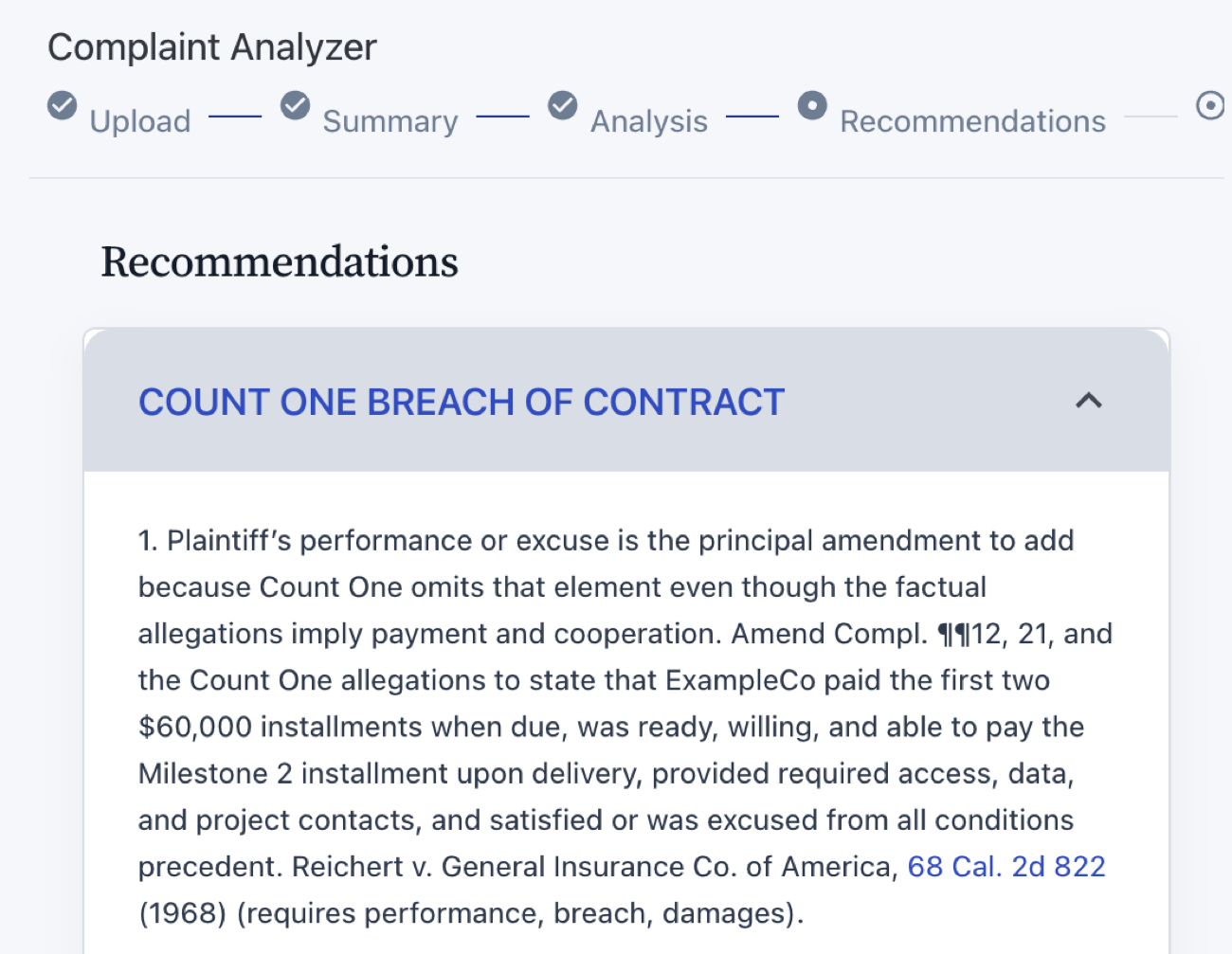
The Recommendations step opened with exactly the right diagnosis, ranked first:
Recommendation 1
“Plaintiff’s performance or excuse is the principal amendment to add because Count One omits that element even though the factual allegations imply payment and cooperation. Amend Compl. ¶¶12, 21, and the Count One allegations to state that ExampleCo paid the first two $60,000 installments when due, was ready, willing, and able to pay the Milestone 2 installment upon delivery, provided required access, data, and project contacts, and satisfied or was excused from all conditions precedent.”
Observed in the SLS LexText account, 24 September 2026.
That is right, and it is right in detail. ¶12 is where the complaint recites the payment obligation without ever alleging payment. The closing phrase is the general averment that Federal Rule of Civil Procedure 9(c) permits for conditions precedent — the shortest route to curing the defect.
Notice how much rides on which screen you stop at:
If you stopped at Analysis
One flagged concern, and it was wrong.
Jurisdiction and governing law, badged Caution and marked Not Met — an issue the pleading does not actually have.
If you read Recommendations
The real defect, ranked first.
The missing element, the paragraphs to amend, and language that would cure it.
The two halves also contradict each other outright on the jurisdiction question: Recommendation 5 says that element “appears sufficiently pleaded.” Read the whole output. A structured interface makes it easy to believe you have finished when a section ends.
Check the element mapping yourself
California states the elements of a breach of contract claim as “(1) the existence of the contract, (2) plaintiff’s performance or excuse for nonperformance, (3) defendant’s breach, and (4) the resulting damages to the plaintiff” — Oasis West Realty, LLC v. Goldman (2011) 51 Cal.4th 811, 821, quoting Reichert v. General Ins. Co. (1968) 68 Cal.2d 822, 830. Those are the authorities this course established independently in Module 3, before any of this was run.
Held against that baseline, the analysis holds up:
Existence of the contract
Supported.
Traced to ¶¶8, 9, 12 and 21. Correct.
Plaintiff’s performance or excuse
Correctly identified as omitted.
Traced to ¶¶12 and 21 as the places to cure it. Correct.
Defendant’s breach
Supported.
Traced to ¶¶10, 11, 14–17 and 22. Correct.
Resulting damages
Supported.
Traced to ¶¶18, 19 and 23. Correct.
Every paragraph reference this course checked was accurate. Two small imprecisions are worth recording anyway, because they are the kind of thing a reader skims past. It says the allegations “imply payment and cooperation” — but our complaint says nothing about cooperation at all, which lives in a contract clause the analyzer never saw. And its Reichert parenthetical here compresses the rule to “requires performance, breach, damages,” dropping the contract itself, where the same case is stated completely a screen earlier.
One distinction the analyzer got right, and you should keep. Failing to plead performance at all is not the same as pleading it without much detail. Rule 9(c) lets a party allege generally that conditions precedent have been performed, so the cure here is a sentence, not a fact investigation. Our complaint omitted even the general averment — which is why the recommendation to add “satisfied or was excused from all conditions precedent” is the right size of fix.
Both of our baseline authorities appeared in the analyzer’s own citation list, each with a parenthetical spelling out the element the pleading is missing, alongside Twombly, Iqbal, 28 U.S.C. § 1332 and Nedlloyd Lines. Citations carry checkboxes and a Generate more citations control. As in Module 4, case names link into LexText’s internal CaseViewer — and as in Module 4, that is not a citator and no currentness check was run here.
Search a separate collection
Doc Search is the other half of this module, and the first thing to know about it is the sentence printed on its own screen:
“Documents uploaded here are separate from your task history and won’t affect your other results.”
It keeps its own corpus. Our matter already had three documents in Case Background; Doc Search still opened empty, inviting uploads of its own. Its header reads DOCUMENT INTELLIGENCE · Doc Search with a NEW badge, and it describes itself as a way to “upload hundreds of documents and search across them — find relevant documents, surface key facts, or identify anything in a large document set.” It has its own Model control and its own limits: 50 MB per file, 1 GB total per matter.
For this course, two documents went in: the fictional agreement and the fictional email thread. Not the complaint — the point was to search the material the drafting workflow never had.
What Guided Drafter could not see
Recall Module 5. The Answer workflow took an uploaded complaint, proposed a damages defense built on foreseeability, and never reached the clause in the agreement that excludes consequential damages outright — because the agreement was not in front of it.
One search found it. The query named no section numbers; it asked for provisions about customer-caused delay, notice of a milestone extension, and consequential damages or lost profits.

Results came back grouped under the query’s own three sub-questions, each hit naming the file, the section number, a descriptive caption, and a quotation. It surfaced the definition of the test data set, the customer’s deadline to supply it, the clause extending milestone dates for customer delay, the proviso requiring written notice of the delay and of the extension claimed, a second notice obligation elsewhere in the agreement, and the exclusion of “indirect, incidental, special, or consequential damages, or… lost profits.”
This course compared each quotation against the source file. Every quoted passage was exact. The only editorial additions were the captions — phrases like “Effect of Customer Delay on Milestones” are LexText’s descriptions, not headings that exist in the agreement.
Two further things worth noticing. The email was in the corpus and appears nowhere in the results, because the query asked for agreement provisions — retrieval followed the question rather than dumping everything relevant-ish. And clicking a filename opens the document in a new tab as extracted plain text: no page number, no highlight, no jump to the passage.
Three surfaces, three kinds of source
Put the whole course together and a pattern appears that is worth more than any individual feature.
Case Assistant
Reads Case Background.
Cited our documents by name and internal section — as plain text. Nothing clickable.
Guided Drafter — Answer
Reads one uploaded complaint.
No Case Background. Case citations appeared in the workflow cards and did not reach the finished pleading.
Complaint Analyzer
Reads one uploaded complaint.
No Case Background either. Case names link into the internal CaseViewer.
Doc Search
Reads only its own uploads.
Separate from everything else. Filenames link to extracted plain text.
Before trusting an answer, know what information that feature could actually see.
The Answer workflow did not miss the damages exclusion because it reasoned badly. It missed it because nobody gave it the agreement. Both analysis tools, working from the complaint alone, still reasoned toward the clauses they lacked — the Complaint Analyzer advised reviewing the exhibit for “limitation-of-liability, consequential-damages waiver, exclusive-remedy, or cure-extension language,” which is a fair description of two clauses it had never read. Good inference is not the same as having the document.
Upload rules are surface-specific too, and this module adds a fifth entry to the list Module 3 started: the Guided Drafter and Complaint Analyzer upload controls both take .pdf, .docx and .doc, and neither takes .txt. Read the control in front of you.
Search is not completeness
Nothing here tests retrieval at scale. This course searched two documents that it wrote itself, with a question written to match them. That is a demonstration, not a measurement.
It says nothing about recall across a real document set, nothing about privilege review, nothing about e‑discovery completeness or production workflows, and nothing about what the tool would miss in ten thousand files. A search that returns good results is evidence that those results exist — never evidence that nothing else does.
Policy
Learn it for practice. Check the policy before you use it for coursework.
Complaint analysis and document search are capabilities, and capability is not authorization. Whether you may point them at assignment materials, professor-provided documents, research-assistant files, or clinic and client material depends on the applicable policy and on permission you actually have — not on the feature existing. Module 2 has the rule.
Both tools will look made for clinic work, because they are made for litigation. That is not authorization to upload a client’s complaint, contract, correspondence, discovery, or case file. Practice on fictional or public material, as this course does, unless actual use has been authorized.
Exercise
Which surface can actually see the information?
Four situations, all drawn from architecture this course observed rather than from how the features sound.
A. You want to analyze whether a complaint adequately addresses each element of its claims.
Show the answer for A
Complaint Analyzer, with the complaint uploaded to it. And read to the end — in our run the element assessment and the recommendations disagreed, and only the recommendations found the real defect.
B. You want to find the lost-profits clause in documents you uploaded specifically to Doc Search.
Show the answer for B
Doc Search. It is the surface that has those documents. Note the wording of the question: the clause is findable because the document is in Doc Search, not because it is somewhere in the matter.
C. You want the Answer workflow to use an agreement that is sitting in Case Background.
Show the answer for C
Do not assume it can. The Answer workflow this course ran took the complaint uploaded into the workflow and offered no route to Case Background — and the omission had consequences, as Module 5 showed. If a workflow needs a document, give that workflow the document.
D. You have confidential clinic correspondence and no authorization to upload it.
Show the answer for D
Stop before choosing a feature at all. Comparing Doc Search against Case Background here would mean the upload decision had already been made. It has not been. That question is answered by clinic policy, supervisor direction, confidentiality and professional responsibility — none of which is a product setting.
LexText Resource Center · LexText-created training
05 Complaint Analyzer, about three minutes, walks through the workflow on a large real-world complaint and matches the live tool closely: expandable cards per count, elements with badges, pincites into the pleading, and citations that open the CaseViewer.
Its interface is the older three-item sidebar again. Doc Search has no Resource Center coverage at all — there is no FAQ section for it, and the walkthrough titled Analyzing & Summarizing Documents is about Create New Task, not Doc Search. Consistent with its NEW badge, and a reason to lean on the live screen rather than the training for that tool.
We have analyzed the pleading and searched the file. What none of it has done is check whether the law is real.