

AI Learning Hub › Learn AI › Self-Paced Courses › LexText at SLS › Draft: Guided Drafter
Module 5 · Beginner to intermediate
Draft: Guided Drafter
The five steps of the Answer workflow, what it reads and never sees, and how to spot a default that is taking a litigation position for you.
By the end
- Say when a structured workflow beats a prompt
- Name the five steps of the Answer workflow
- Know what the workflow reads, and what it never sees
- Recognize a default that is taking a position for you
- Tell an AI-proposed defense from a supportable one
- Review a generated pleading for what nobody asked for
What changes when LexText guides the drafting process instead of waiting for a prompt?
Module 4 asked open questions and got prose back. This module runs the other door: a workflow that knows what an Answer looks like and asks you for the parts. Structure moves judgment into the choices you make before the prose is generated rather than removing it.
That is the whole module in a sentence. What follows is what those choices actually were, what LexText decided when we did not, and what turned up in the finished pleading that nobody had asked for.
From question to workflow
Case Assistant
You frame an open-ended task.
You decide the shape of the request and the shape of the answer. Good when the work product has no fixed form.
Guided Drafter
LexText defines a sequence of inputs.
The output format is known in advance, so the tool asks for the parts instead of waiting for a prompt. Good when the document has a conventional structure.
An Answer is the clearest case for the second. Its form is fixed by rule and convention: respond to each numbered allegation, then plead affirmative defenses, then ask for relief. There is nothing to invent about the container — only about what goes in it.
Choose the work product
Guided Drafter opens on Choose a workflow, subtitled “Select the work product you want to create,” and reports 8 workflows in three groups: two Pleadings (Complaint, Answer), five discovery workflows, and the Complaint Analyzer under Analysis. Module 1 lists them.
Selecting Answer opens a small dialog — START WORKFLOW, described as “Respond to allegations paragraph by paragraph, then develop affirmative defenses” — with one field, Draft Name. Naming it creates a draft in the matter immediately, before a single decision has been made.
No prompting does not mean no lawyering
LexText’s FAQ says Guided Drafter needs “No prompting required.” That is true and worth understanding precisely.
What it does mean
You never compose a free-form prompt.
No blank box, no prompt craft, no wondering what to ask for. The workflow supplies the questions.
What it does not mean
No input, no judgment, no review.
Our run required dozens of decisions, several of them substantive litigation positions, and the finished draft still needed reading line by line.
No prompting does not mean no lawyering.
Our practice Answer
This course ran the workflow once, in its own practice matter, to produce a fictional Answer for DemoSoft Systems, LLC to the fictional complaint of ExampleCo Analytics, Inc. that Module 3 built. The Complaint workflow was deliberately not run, because the matter already has a complaint — and because analyzing that complaint is Module 6’s job.
This is a training exercise and nothing else. The draft described below has not been filed, is not filing-ready, is not legal advice, and is not a model pleading. It exists so that a learner can watch a structured workflow turn inputs into prose, and then see what reviewing that prose involves.
What LexText asked for
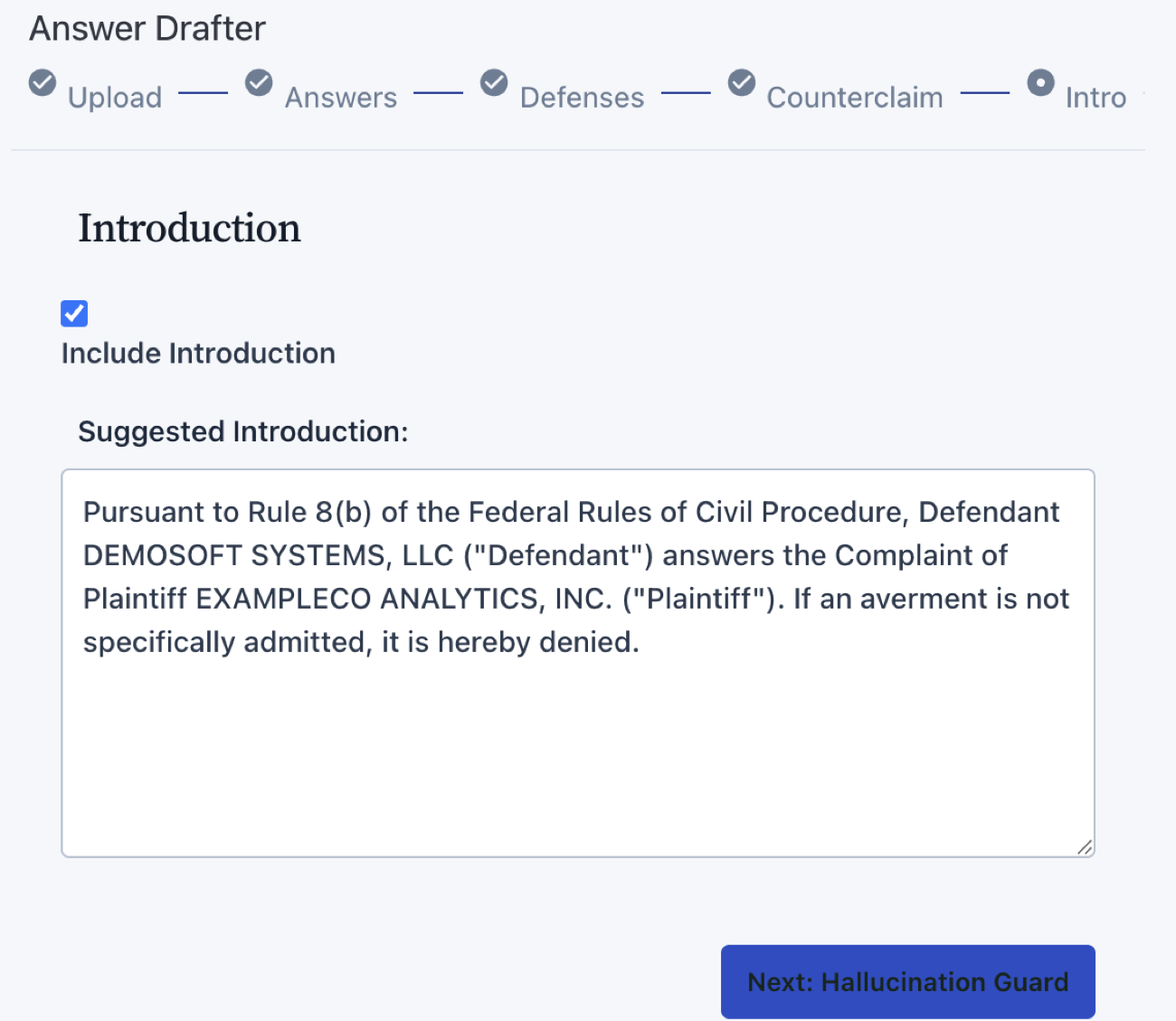
Five steps, shown as a progress bar across the top: Upload → Answers → Defenses → Counterclaim → Intro.
Upload — and what the workflow never sees
The first step wants a file: Upload a complaint (.pdf/.docx/.doc). There is no option to use Case Background. That is the single most consequential fact about this workflow, and it comes back at the end of the module.
From the uploaded complaint LexText extracted the defendant — presented as a checkbox — and every numbered paragraph, grouped under the complaint’s own headings. That is real document parsing, and it was accurate.
Answers — one decision per paragraph
Each extracted paragraph gets a dropdown with four options: Deny, Admit, Without Knowledge, and Custom, the last opening a free-text box. Twenty-three paragraphs, twenty-three decisions.
Defenses — suggestions with reasoning
LexText proposed three affirmative defenses as expandable cards. Each one, opened, contains a heading naming the cause of action it addresses, a paragraph of reasoning applied to the actual complaint, and a list of Supporting Citations rendered as links. This is the most substantive thing the workflow produces, and it is examined below.
Counterclaim
A single checkbox, File a Counterclaim, plus a free-text box asking whether there are additional facts to consider.
Intro
A checkbox, Include Introduction, and an editable Suggested Introduction already written — in our run, a Rule 8(b) preamble naming both parties correctly.
Watch the defaults
Here is the finding this module is built around. Every step arrives with something already chosen, and the three steps do not agree with each other about what a safe default looks like.
Answers
Every paragraph defaults to Deny.
Opt out, paragraph by paragraph.
Defenses
Every suggestion is included.
Each card carries a checkbox reading Ignore this Affirmative Defense. You exclude; you do not select.
Counterclaim
None is filed.
Opt in. The only one of the three whose default asserts nothing.
Deny-by-default is the one to think hardest about.
Accepting it in our practice matter would have produced an Answer in which DemoSoft denies that the Agreement exists, denies the terms of its own contract, denies the definition it wrote, and denies the contents of an email its own implementation lead sent.
Every one of those facts is established by documents in DemoSoft’s own record. A default is not a recommendation, and it is certainly not a reading of the file. Of our twenty-three paragraphs, twenty-one needed changing: nine to Admit, six to Without Knowledge, six to Custom. Two were left at Deny — the two that actually contest liability and damages.
Three consecutive steps, three different default postures. That is precisely why you cannot form a habit about them. Read each one.
The decisions were ours, not the tool’s
Everything below was a human choice, made by reading the fictional record rather than by accepting a suggestion:
- Which paragraphs to admit. Nine, each traceable to a specific clause of the Agreement or a line of the email thread.
- Where to plead lack of knowledge. Six, using the option’s proper Rule 8(b)(5) sense: the record genuinely does not establish them.
- Where a canned option would misstate the position. Six paragraphs needed custom text — characterizations, legal conclusions, the incorporation paragraph, and a partial admission.
- Which defenses to assert. Two kept, one rejected.
- Whether to counterclaim. No — the record gives DemoSoft no affirmative claim, and inventing one was not an option.
Two answers in our draft are artifacts of a thin record, not models to copy. Paragraph 13 alleges that DemoSoft completed the first milestone, and paragraph 3 alleges who DemoSoft’s sole member is. Our fictional file is silent on both, so both were answered with lack of knowledge. A real defendant would know its own corporate structure and its own performance history, and would be expected to find out before responding. This is a limit of a deliberately small training corpus showing through — read it as a reminder that you supply what the file does not, not as an example of how to answer.
What LexText generated
A four-page Answer, saved automatically under the matter’s drafts, laid out as a pleading with numbered lines and a caption. Its headings mirror the complaint’s own: RESPONSES TO ALLEGATIONS, then ANSWER TO THE PARTIES, ANSWER TO JURISDICTION AND VENUE, ANSWER TO FACTUAL ALLEGATIONS, ANSWER TO COUNT ONE – BREACH OF CONTRACT, and ANSWER TO PRAYER FOR RELIEF. Then AFFIRMATIVE DEFENSES, and REQUEST FOR RELIEF.
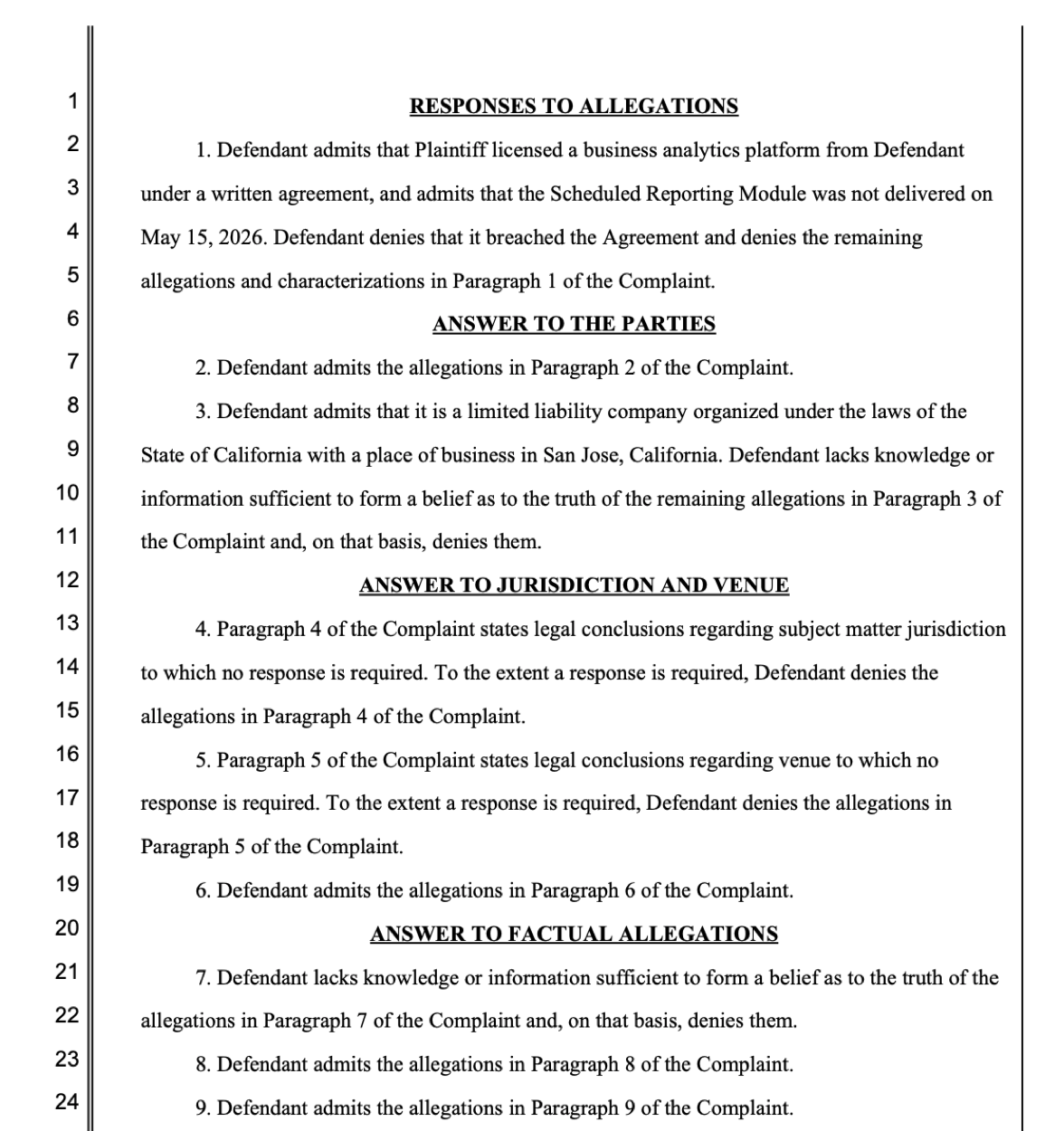
The conversions are competent. Each selection became conventional pleading prose, and Without Knowledge rendered in its proper form — “Defendant lacks knowledge or information sufficient to form a belief as to the truth of the allegations in Paragraph 7 of the Complaint and, on that basis, denies them.” All twenty-three positions came through as chosen.
Check it against the record
Now the part that matters. Reading the finished draft against the file and against what was actually selected turns up three things nobody asked for.
A defect
“That Plaintiff take nothing by his Complaint.”
ExampleCo Analytics, Inc. is a corporation. Small, but it is the kind of thing a reader notices before they notice anything else.
Unsupported
A request for attorneys’ fees.
Our Agreement contains no fee-shifting clause and no statute was invoked. Under the American rule that request has no basis in this record. It is boilerplate, and nobody selected it.
Adds gloss
Relief denied twice over.
A plain Deny was chosen for the damages paragraph; the draft appended a denial of entitlement to relief, then generated a further paragraph denying the prayer. Defensible drafting — but not what was selected.
None of these is catastrophic and none required special insight to find. They required reading. That is the entire skill this module is trying to install.
One more thing to notice: the citations do not travel. The defense cards in the workflow carry supporting authority. The affirmative defenses as they appear in the pleading carry none — the reasoning is converted to prose and the citations are left behind in the interface. If you want authority in the document, you supply it.
The defenses, and what still needs legal review
LexText proposed three. Each came with reasoning tied to our complaint and with citations. Taking them in turn is a useful exercise in not being flattered by a good-looking suggestion.
Consequential damages not foreseeable — kept, with a caveat
LexText argued that the alleged customer non-renewals and lost revenue are consequential damages not recoverable unless shown to be within the parties’ contemplation, citing Lewis Jorge Construction Management, Inc. v. Pomona Unified School District (2004) 34 Cal.4th 960 and California Civil Code section 3300. Both authorities are real, and section 3300 says what it is cited for.
The caveat is what it missed. The Agreement in this matter contains a clause excluding consequential damages and lost profits outright. That is a stronger and more directly record-grounded answer to the same allegations than a foreseeability argument. LexText did not find it — and the reason is the whole point of the next section.
Uncertainty and speculative damages — kept
LexText argued that the alleged lost revenue is speculative because the complaint pleads only that customers cited reporting delays, not facts establishing causation or the amount of net loss. It cited Lewis Jorge again and California Civil Code section 3301, which provides that “no damages can be recovered for a breach of contract which are not clearly ascertainable in both their nature and origin.”
This one reads the complaint accurately. It is a fair reading of what paragraph 19 does and does not allege.
Failure to mitigate — rejected
The doctrine is real and the authority LexText offered appears to be real. Our record does not support asserting it. Nothing in the file shows ExampleCo failing to mitigate, and the complaint points the other way: it alleges that ExampleCo hired outside contractors to produce the reports manually, which looks like mitigation undertaken rather than mitigation neglected.
A suggestion can be doctrinally sound and still be wrong for your case. The card offered no facts because there were none to offer.
Asserting a defense is a representation, not a menu selection. Whether any of these is available on these facts is a legal question this course has not answered — it has only checked that the authorities exist and say roughly what they are cited for. Pinpoint pages were not confirmed, no citator was run, and nothing here says any of these cases remains good law. Before relying on any of it, research it properly.
Why the strongest argument never appeared
Recall the first step. The workflow takes an uploaded complaint and offers no way to draw on Case Background. So the only document it had was the complaint. A workflow can only reason about what you put into it.
The contract clause that would have answered the damages allegations most directly was sitting in Case Background, four steps away and invisible to this workflow. LexText did not overlook it; it was never given it. That is not a flaw to complain about so much as a property to work with — and it is why Module 4’s lesson about naming your context applies here too, in a different form.
Getting the draft out
This is the clearest live-versus-training gap in the whole course, so it is worth being exact.
What LexText’s material says
A Word pleading.
The FAQ says you “download a finished draft in Word pleading format.” The Answer walkthrough is described the same way, the workflow’s own panel promises “Download your draft Word doc,” and the video ends with the file open in Microsoft Word.
What the Stanford instance produced
A PDF.
Downloading our practice Answer produced a four-page PDF, generated server-side. No Word file was offered. This course therefore does not tell you that LexText produces an editable Word pleading, because on this instance, on this day, it did not.
Four separate vendor statements promise Word; the live product delivered PDF. Add it to the list from Module 1 — and notice that this one has a practical consequence rather than being a curiosity. A PDF is not a draft you keep working on.
Profile appears in the caption. Module 3 mentioned that LexText can use your Profile contact information when it builds a caption page. In the generated Answer it does, on page one. Two consequences worth carrying: whatever is in your Profile ends up in the document, and a screenshot of page one of any draft you make is a screenshot of your own contact details. That is why the image above starts on page two.
Before anyone signs it
Reviewing a generated pleading
- Did it respond to everything it needed to? Every allegation, and the prayer.
- Did it invent anything? Compare against the file, not against your memory of the file.
- Are the admissions and denials the ones you chose? Check the defaults you left alone as carefully as the ones you changed.
- Is every asserted defense supportable on these facts? Not plausible — supportable, by this record.
- Does the caption name the right parties and the right court?
- Are any citations accurate, and are they current? Read the authority; run a citator.
- Does the relief requested match the position? Ours asked for attorneys’ fees nobody had a basis for.
- Did Profile-derived information populate correctly — and should it be there at all?
- Does the applicable course, clinic, or workplace policy permit this use?
- Would a lawyer actually sign this version?
Working through this list does not make a draft filing-ready. It makes it a draft you have read.
Policy
Learn it for practice. Check the policy before you use it for coursework.
Guided Drafter is exactly the kind of professional capability this course should teach, and nothing here says otherwise. But using generative AI to draft or revise submitted student work is governed by the applicable course policy and, under the current SLS default rule, requires advance disclosure and written instructor authorization before the tool is used. Drafting a pleading is the paradigm case, not an edge case. Module 2 has the detail.
A guided pleading workflow will look especially relevant to clinic work, and that appearance is the trap. It does not authorize uploading client documents, drafting client pleadings, or preparing anything for filing. Clinic policy, supervisor direction, confidentiality, and professional responsibility are separate requirements and none of them is satisfied by the product being good at this. Our example stayed fictional for that reason.
Exercise
Who made this decision?
Four moments from the run above. For each, decide whether it is primarily a workflow decision the tool structures, a human factual or legal judgment, or a verification task.
A. Choosing Answer from the eight workflows.
Show the answer for A
A workflow decision, made by the user. You pick the work product; LexText then owns the sequence of questions. It is the one point where the structure is entirely your choice — and picking the wrong workflow is the cheapest mistake to make and the most annoying to undo.
B. Deciding whether to admit or deny paragraph 14.
Show the answer for B
Human factual and legal judgment, every time. The dropdown is a control; the position is a representation to a court. Note that the tool had already chosen Deny for you, so doing nothing is also a decision — just an unexamined one.
C. LexText turning those selections into pleading prose.
Show the answer for C
Generation performed by the tool — and the part it did well. But generation is also where the unrequested material entered: the pronoun error, the fee request, the extra denial. The tool owns the drafting; you own the result.
D. Deciding whether the proposed failure-to-mitigate defense is supportable.
Show the answer for D
Verification and legal research, and it was the decision that mattered most in this run. LexText presented it in the same format, with the same confidence, as the two defenses we kept. The difference was not visible in the interface — it was visible in the file. The defense was dropped because the record did not support it, not because the doctrine was wrong.
LexText Resource Center · LexText-created training
03 Drafting Answers, about three minutes, walks through uploading a complaint and building a responsive Answer. It matches the live workflow closely on the steps that matter — upload, per-paragraph responses, suggested defenses.
Two differences to expect. Its interface is older than the Stanford instance: it shows only drafts, Case Background and Guided Drafter in the sidebar, where ours also has Case Assistant, Doc Search and Hallucination Guard. And it ends by opening the finished draft in Microsoft Word, which is not what the Stanford instance produced.
We have answered the complaint.