

AI Learning Hub › Learn AI › Self-Paced Courses › LexText at SLS › Ask: Case Assistant and Legal Research
Module 4 · Beginner to intermediate
Ask: Case Assistant and Legal Research
Structure a request so the answer is checkable, tell persistent context from one-task context, and verify an authority yourself rather than trusting a link.
By the end
- Create a task and know what a task is
- Structure a request so the answer is checkable
- Tell persistent context from one-task context
- Read a generated result and know what its controls do
- Say what LexText’s document references are, and are not
- Run legal research and verify an authority yourself
How does LexText use a matter’s context when I ask an open-ended litigation question?
Module 3 ended on a deliberately unfinished note: three documents sit in Case Background, and nothing on screen says whether LexText has read them. Uploaded is not the same claim as used. This module tests the second claim by running a real task and checking the answer against the documents.
A task inside a matter
A matter is the case. A task is one piece of work inside it. Everything you ask Case Assistant for is a task, tasks are listed under the matter, and each one gets its own page you can come back to.
Creating one is the + Create New Task control, and the dialog is the same shape as the one that made the matter: a single field, Task Name, then Create. The prompt is not part of creation — you name the task first, then write the request in the composer.
LexText’s own FAQ describes Create New Task as “your open-ended workspace — use it for anything that falls outside Guided Drafter’s structured documents,” and suggests naming a task after the work product: Opposition to Motion to Dismiss, Motion to Compel, Deposition Outline, Legal Research — Personal Jurisdiction. That last example is worth noticing now; we come back to it at the end of this module.
So the two doors from Module 1 resolve like this: Guided Drafter is for the eight work products it knows the shape of. Case Assistant, reached through a task, is for everything else.
Ask: how to structure a request
There is no trick to this and no acronym to memorize. A request that produces a checkable answer tends to name four things.
Task
What do you want LexText to do?
One job, stated as a verb. “Identify the main factual dispute,” not “tell me about the case.”
Context
What should it work from?
Which matter, which documents. Saying “using the Case Background for this matter” costs nothing and makes the answer’s basis explicit.
Boundaries
What should it not do?
The most useful line in any legal AI prompt is an instruction to say “the material does not support this” instead of filling the gap.
Evidence
What support do you want shown?
Ask it to name the document behind each statement. You need that to check the work — and, as this module shows, LexText will not supply it unless you ask.
Here is the request this course actually ran, with those four parts visible in it:
Task name: AI Learning Hub Practice — Performance and Milestone Facts. And the prompt:
The practice prompt
Using the Case Background for this matter, identify the main factual dispute about ExampleCo's performance and DemoSoft's missed software milestone.

For each side, identify the facts in the Case Background that support its position and name the document each fact comes from.

Do not draft a pleading and do not reach a final legal conclusion.

If the Case Background does not support a point, say so rather than fill the gap.
No task-specific documents were attached. That was deliberate: with nothing attached, anything the answer knows about the case has to have come from Case Background.
Persistent context and one-task context
Two ways to give LexText documents, and the difference is how long they stay.
Case Background
Reusable across future tasks in the matter.
The spine of the case. LexText’s FAQ says a task will “pull from your Case Background automatically.” Around 30 documents per matter.
Task-specific documents
Added for the task in front of you.
The + Add Task-Specific Docs control beside the composer. Up to 10 per task prompt. For material that matters to this one request.
What this course has not tested. No task-specific document was uploaded, so nothing here is a claim about what happens to one afterward — whether it persists, whether later tasks can see it, or how it is stored. The distinction above is drawn from the control’s own label and LexText’s documentation. Separately, and worth keeping straight from Module 3: neither of these is Doc Search, which keeps its own documents and told us so on screen — “Documents uploaded here are separate from your task history and won’t affect your other results.”
What came back
The result surface is plainer than you might expect, and knowing its shape saves you hunting for controls that are not there.
- The task title sits in the breadcrumb under the matter name, with a pencil to rename it.
- Your original prompt stays visible at the top, in its own block, with a copy control.
- While it runs, a line reads “Answering the user’s question…” with a live token count, and Send becomes Stop.
- The answer uses bold section headings, prose, numbered lists, and two-column tables.
- The composer stays at the bottom for follow-ups, still carrying Model and + Add Task-Specific Docs.
- At the end of the answer there is one control: copy.
There is no export, no download, no Word option, no edit, no rewrite, and no rating on a Case Assistant answer. The Word pleading export that Module 2 quoted belongs to Guided Drafter, not here. If you want a Case Assistant answer out of LexText, copy is the route this course observed.
Was Case Background actually used?
Yes — and the way we know is worth more than the answer itself.
The answer laid each side’s facts out in a table with a Source document column, naming our files and pinpointing inside them: fictional-software-agreement.pdf, Section 3.2; fictional-complaint.pdf, Factual Allegations ¶ 10; fictional-project-status-email.pdf, the Morgan Ellis message of 18 May 2026, 9:14 AM.
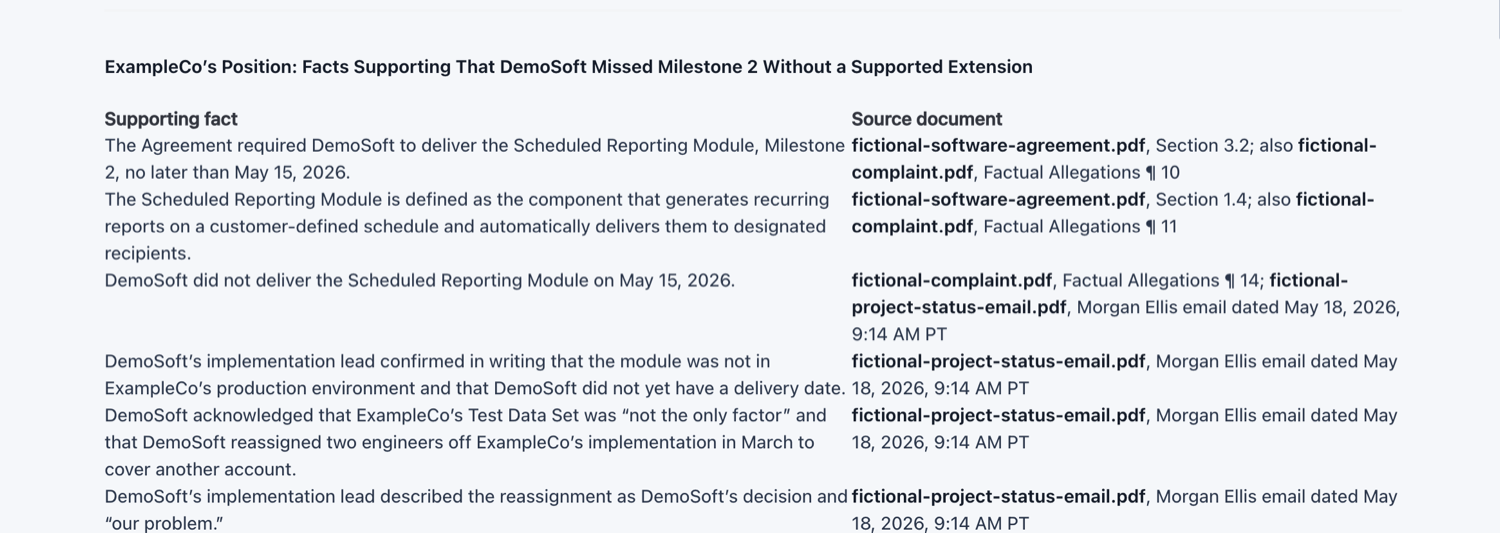
Those pinpoints are the evidence. A model with no access to the documents could guess that a software contract has a delivery deadline; it could not know that the deadline lives in Section 3.2 and that the definition it depends on lives in Section 1.4. Every pinpoint this course checked was correct.
Two spot checks against our own files
Supported. LexText: “The Agreement required DemoSoft to deliver the Scheduled Reporting Module, Milestone 2, no later than May 15, 2026,” citing the agreement at Section 3.2. The agreement reads: “Provider shall deliver the Scheduled Reporting Module, Milestone 2, no later than May 15, 2026.”
Supported. LexText: “DemoSoft’s implementation lead stated that the April 24 extract was missing the carrier dimension, requiring DemoSoft’s team to rebuild the validation set by hand,” citing the 9:14 AM email. The email reads: “the extract we eventually received was missing the carrier dimension, so our team rebuilt the validation set by hand.”
Both checks passed. This course went looking for a problem and did not find one in this sample, and says so rather than manufacturing a lesson. Two checks out of a long answer is a sample, not an audit.
Two further things the answer did well are worth naming, because they are habits to expect and to notice when they are missing. It wrote “DemoSoft’s implementation lead stated that…” rather than asserting contested facts as true. And it answered the boundary instruction directly, with a section on what the material does not establish — including that the Case Background contains no written notice from DemoSoft, before the milestone, claiming the delay and extension the agreement requires such a notice to claim.
Follow the documents — and what you cannot follow
Here is the finding that matters most in this module, and it is a limitation rather than a feature. Those filenames are text, not links.
This course clicked two of them. Nothing happened: no document opened, no panel appeared, no passage was highlighted, no page was jumped to. LexText produced the source column because the prompt asked it to. There is no citation affordance behind it, no sources panel, and no click-through to the uploaded file.
Three consequences for how you work.
- Ask for sources explicitly, every time. A prompt that does not request them will produce an answer you cannot check without re-reading everything.
- Verification means opening the document yourself. Go to Case Background, open the file, find Section 3.2, read it. There is no shortcut in the interface.
- A named source is a claim about where a fact came from. It is generated text like the rest of the answer, and it can be wrong in exactly the way the rest of the answer can be wrong.
Fast and Deep
The composer offers a Model control with two settings, Fast and Deep. Deep was selected by default and is what the practice task ran on.
That is the whole of what this course will say about them. LexText lets you choose between Fast and Deep for a task. The interface does not explain what either does, the finished answer does not restate which was used, and this course did not run the same task twice to compare. Nothing here says Deep is more accurate or Fast less reliable — that would be an invention, and a single pair of runs could not have established it anyway.
Pivot to legal research
Matter facts and legal authority are different questions, and LexText answers the second one through the same door as the first.
Its FAQ is explicit: “Use Create New Task. Name your task something like ‘Legal Research — Personal Jurisdiction’ or ‘Legal Research — Statute of Limitations.’ Enter your research question as the prompt.” There is no separate research surface in the sidebar. Research is a task with a research question in it.
A documented control this course could not find. The same FAQ adds that you can “click the Legal Research button in the top-right corner of any active task to pivot into a research question on the fly.” No such button was present on the completed task in the Stanford instance — the top right holds only Resources and Profile. This course teaches the path it could confirm. Add it to the list from Module 1: training and live features move at different speeds.
So the research run used a second task, named AI Learning Hub Practice — Legal Research: Breach of Contract Elements, asking what California law requires a breach-of-contract plaintiff to plead about its own performance. Nothing was attached.
What research output looks like
Structurally it resembles the first answer — bold headings, numbered lists, prose, and the same lone copy control. What changes is the citations.

Legal authorities are links. Your own documents are not.
Case names arrive as working links. Selecting one opens a CaseViewer inside LexText, which carries the case name and citation, an Also Available On row with buttons for CourtListener, Westlaw, and Lexis, a LexText Synopsis with a generated Holding box, the full opinion text with star pagination, and a Case Details panel listing filed date, precedential status, parallel citations, and judges. Statutes are not linked — the code sections in the answer are plain text.
Two things the CaseViewer is not.
It is not a citator. The Precedential Status: Published field says the opinion was published. It says nothing about whether the case is still good law, and no currentness indicator, flag, or treatment history appeared anywhere in this course’s observation.
Its synopsis is generated. The holding box is LexText’s summary of the case, not the court’s words. The opinion text below it is a reproduction, and the copy this course read carried visible transcription errors of the kind scanned text produces. Read the authority, not the summary of it.
Verify the law separately
The research answer gave the four California elements and cited Oasis West Realty, LLC v. Goldman (2011) 51 Cal.4th 811, 821, quoting Reichert v. General Ins. Co. (1968) 68 Cal.2d 822, 830. So this course checked them somewhere else.
What was checked, against what
The proposition. Stanford’s own SCOCAL archive of the opinion states the elements as “(1) the existence of the contract, (2) plaintiff’s performance or excuse for nonperformance, (3) defendant’s breach, and (4) the resulting damages to the plaintiff,” citing Reichert at 830. Supported.
The pinpoint. Page 821 was checked in CourtListener’s reproduction of the opinion, which carries star pagination: the *821 marker falls immediately before the elements sentence. Supported. Note that CourtListener warns its text came from a scanned document and may contain typos.
A statute. California Code of Civil Procedure section 457, which the answer cited for pleading conditions precedent generally, reads on California’s official legislative site: “it may be stated generally that the party duly performed all the conditions on his part, and if such allegation be controverted, the party pleading must establish, on the trial, the facts showing such performance.” Supported, including the quoted phrase.
Not checked: the pinpoint pages in the two Court of Appeal cases, two of the four Civil Code sections, and the current status of any authority. No citator was run. Nothing in this course says any of these cases remains good law.
One more thing a careful reader would notice, which no tool will tell you: Oasis West Realty is an anti-SLAPP case about a lawyer’s duties to a former client. The elements of breach of contract appear in it as a single passing sentence while the court lines up three causes of action. California courts do cite it that way and the citation is fair — but knowing what a case is actually about is part of reading it, and a citation in a generated answer will not carry that.
Did the research answer use the matter?
LexText’s FAQ says a research task “will also pull from your Case Background automatically.” The answer showed no visible sign of it: no reference to our documents, no mention of ExampleCo or DemoSoft, nothing drawn from the file.
Be careful what you conclude from that. The prompt told it not to assume the fictional facts satisfied the elements, which is an instruction to stay away from them, and the answer closed by saying exactly that the allegations “should not be assumed satisfied in a fictional matter.” So this course cannot tell you whether Case Background was consulted and left unused, or not consulted at all. What the interface proves is only that the research answer is about the law, not about this case.
Which is the useful distinction anyway:
Matter facts
What happened, according to the documents.
Checkable against files you control. Verify by opening them.
Legal authority
What the law requires.
Checkable against published sources outside LexText. Verify there, and check currentness with a tool built for it.
Before you point this at real work
Learn it for practice. Check the policy before you use it for coursework.
Everything in this module ran on fictional facts, fictional documents, and public legal authority. That is what made it safe to publish. It is not a finding that the same steps are permitted with different inputs. Pasting assignment facts, your own draft, professor-provided material, or clinic files into a task is a different act, and Module 2’s questions apply to it before you upload or generate.
Exercise
What context belongs where?
Four situations. Decide before opening each answer.
A. A complaint that defines the dispute and will matter across many tasks.
Show the answer for A
Case Background. Persistent context is for the spine of the case — the documents nearly every later task needs. Attaching it per task would mean attaching it every task.
B. A one-off exhibit relevant only to a single analysis task.
Show the answer for B
A task-specific document, if you are permitted to upload it at all. It belongs to this request, not to the matter’s permanent library, and Case Background has a ceiling worth saving for documents that earn it.
C. A question about the elements of a California breach-of-contract claim.
Show the answer for C
Legal research — which in LexText means a new task with the research question as the prompt, not a separate tool. Then verify the authorities independently: read the case outside LexText, confirm any pinpoint, and use a currentness tool, because the CaseViewer is not a citator.
D. A confidential clinic document that has not been approved for LexText.
Show the answer for D
Stop before choosing a LexText surface at all. The question is not Case Background versus task-specific versus Doc Search — picking a container would mean the upload had already been decided. Whether this document may be given to the tool is a permission question: clinic policy, supervisor direction, the confidentiality position, and the applicable professional-responsibility rules. None of those is a product feature, and none of them is answered by the product being good at handling case files.
LexText Resource Center · LexText-created training
Two walkthroughs match this module: 09 Legal Research (“Run targeted legal research within Create New Task. Name your task, prompt your question, attach docs.”) and 08 Legal Memos & Depo Outlines. The Create New Task and Legal Research FAQ entries are the source of several quotations above.
LexText-created product training hosted on the Stanford instance. It describes how the product works, not what you are permitted to use it for — and on at least one point in this module it describes a control the live instance does not have.
We can ask the matter questions and check the answers.